Newsleecher iPhone / iPad / Android Client

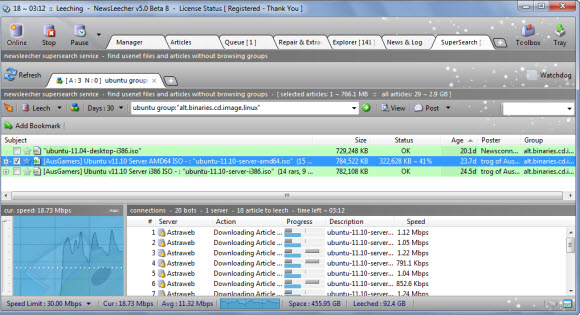
Earlier this week we tested Newsbin Pro using a remote desktop app called Splashtop.  Since then we decided to test some more Usenet clients including Newsleecher.  The results were equally impressive.  As the Splashtop app allowed us to easily access Newsleecher on our Windows 7 system and remotely control the newsreader.  Here is a screenshot of Newsleecher running on the iPad.

As you can see above we were able to connect to our desktop from an iPad via Splashtop.  The graphics display was good and responses times were quick.  After a couple days the touchpad controls are now almost second nature.  We really enjoy accessing our favorite newsreaders via Splashtop.  Here ‘s the scoop on the app.

Splashtop remote desktop app:

  • Splashtop for iPad: $1.99 – iTunes product page
  • Splashtop for iPhone / iPod Touch: $0.99 – iTunes product page
  • Splashtop for Android devices: $2.99 – Android product page
  • Spashtop HD for Android devices: $6.99 – Android product page
  • Splashdot remote desktop for Palm Pre: $4.99 – Palm product page
  • Remote desktop app for iPad, iPhone, iPod Touch, Android and Palm Pre
  • Splashtop supports 30 FPS (frames per second)
  • Latency is around 174 ms.  Which is about .2 seconds.

So far we’ve tested Newsleecher along with Newsbin Pro and Binreader.  Using Splashdot from our iPad to remotely control each client from our Windows 7 box.  These are all clients that don’t otherwise offer mobile apps.  So accessing them from iPad is definitely a treat.  We look forward to bringing you more coverage of Splashtop and other apps that help make our Usenet experience even more enjoyable.

Usenet Guide : Avoiding Password Protected RAR Files

Password protected RAR files are annoying to say the least.  We’re not going to say that 100% of the passworded files are spam but most certainly appear that way.  Or worse as many posts instruct the downloader to visit a site.  Enter survey information, join the site, accept certain offers, etc.  Not to mention the viruses and malware that can be attached.  For those reasons we choose to avoid password protected posts.

If you agree and would like to disregard passworded RAR files then read on as we’ll provide some tips for finding the passworded posts before downloading.  Saving you lots of time and bandwidth / Usenet account usage.  With an additional tip to help avoid RAR-in-RAR archives.

Step 1 – Mysterbin Advanced Search – No Password

You’ll want to start with a quality Usenet search site like Binsearch or Mysterbin.  In the case of Mysterbin you can choose whether or not to include password protected files in the search results.  Simply visit https://www.mysterbin.com/advsearch, click on the Advanced Search page and choose  “No Password”.

In addition you might want to check out Nzbmatrix as their members often post comments related to password protected posts.  The site is also a good source of information on the quality and usability of newsgroup posts.

Step 2 – Newsleecher Leech Tweaks – Pasworded RAR-in-RAR Archives

Those who gain from password protected RAR’s have found a way around the Usenet search engines blocking passworded posts.  To avoid detection they are including a non-passworded RAR archive with a password protected RAR inside.  Staying one step ahead of most nzb sites and newsreaders.  However the Newsleecher v5.0 beta 5+ (download) has a new RAR-in-RAR Archive feature.

To access the new feature click on Tools – Settings.  Then choose the Leech Tweaks under Download.  Here you have the option to pause downloads that include password protected RAR-in-RAR archives.  Some other useful tweaks above let you tell Newsleecher how to treat PAR files.  Choosing to “Auto Pause PAR Files” can save you even more bandwidth when repairs aren’t necessary.

Linux fans will also want to check out URD (Usenet Resource Downloader) as we understand the Usenet browser will automatically detect encrypted RAR’s and cancel the downloads when found.

We hope our guide will help you avoid password protected RAR archives.  If you’re having additional issues with performance or completion check out our list of top Usenet providers.  As not all Usenet services are created equal but you can find quality, unlimited Usenet access for under $10 a month.

NewsLeecher 5 : SuperSearch Watchdog Feature

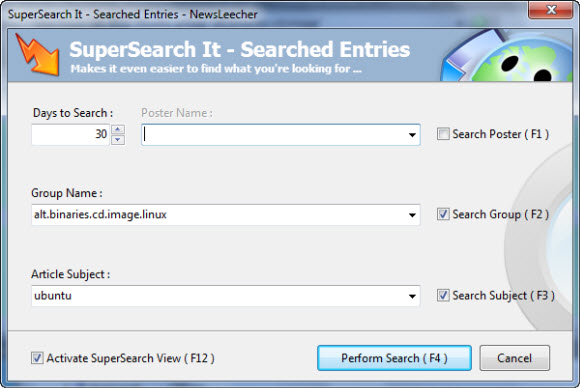
NewsLeecher is quickly rolling out new features in their version 5 beta releases.  One of the recent enhancements caught our attention.  Along with many other Usenet fans we enjoy NewsLeecher’s SuperSearch feature.  Now NewsLeecher is raising the bar with a new SuperSearch Watchdog feature.

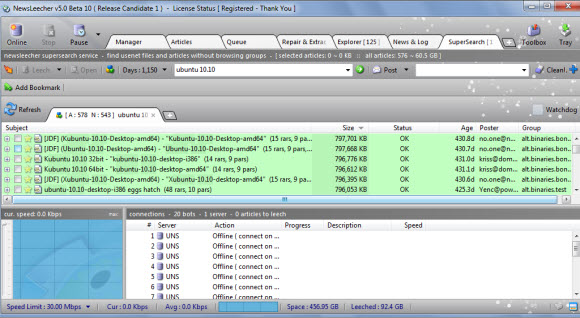
As you can see in the image above SuperSearch let’s you search across up to 1,050 days of retention.  Not that anyone supports that many days yet but it won’t be long.  What caught our eye was the new Watchdog feature.  Here’s an explanation of the cool new addition from the NewsLeecher v5.0 Beta 2 release notes:

   ---------------------------------------------------
   << Major Feature Addition - SuperSearch Watchdog >>
   ---------------------------------------------------
   The SuperSearch Watchdog feature automatically spots freshly
   indexed article collections in your SuperSearch search results.
   "Freshly indexed" means that the article collections were
   indexed by the SuperSearch indexer *after* your prior
   similar SuperSearch search was performed. The purpose of the
   watchdog feature, is to make it very easy to locate the
   SuperSearch article results you haven't already browsed.

Cheers to the team at NewsLeecher for adding the cool new feature.  We also enjoyed the new tabbed user interface and look forward to future enhancements.  Read our NewsLeecher review to learn more about the Usenet client or download a 14 day free trial and test out the new Watchdog feature for yourself.


NewsLeecher 5 Beta 1 : Multi-Tabbed SuperSearch

Many wondered how long NewsLeecher development would continue last year with the long delay for the version 4 final release.  Since then NL’s developer has answered with continued development and the quick release of NewsLeecher v5 Beta 1.  The new version includes multi-tab SuperSearch functionality.

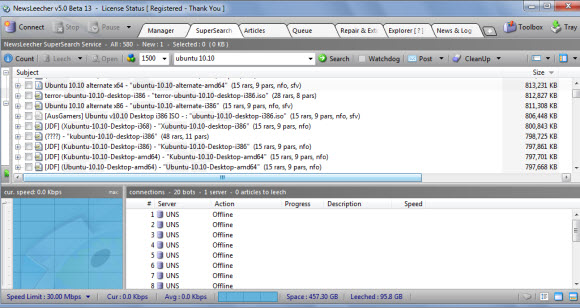
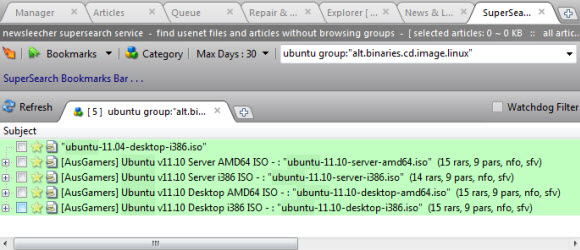
You can see the new multi-tabbed SuperSearch in action above.  With tabs for Ubuntu, Ubuntu 10.10 and Ubuntu 10.10 desktop.  In addition NewsLeecher has once again increased the supported retention in SuperSearch.  Now the Usenet search engine supports 1,050 days of binary retention.  While there aren’t any Usenet providers currently supporting 1,050 days of retention that should change in the months ahead.

NewsLeecher 4 Final was released on November 30th off last year.  With NL version 5 beta 1 coming just a few days ago on January 16th.  While development was already underway on the beta we’re impressed by the progress in bringing the much anticipated multi-tabbed SuperSearch feature to market quickly.  Stay tuned for details on beta 2.  in the meantime download beta 1 and receive a free 14 day trial of NewsLeecher.

NewsLeecher Version 4.0 Final Released for Download

Newsleecher just announced that version 4 is final.  Those who didn’t try the beta version are in for some nice surprises.  Both in client features and functionality.  Along with SuperSearch updates.  NewsLeecher V4.0 final is available for download at http://www.newsleecher.com.  Current customers can download version 4 free.  Those new to the Usenet client can try it free for 14 days.


We’re happy to see NL v 4.0 go final and more excited to hear that NewsLeecher version 5 is already in development.  With a renewed commitment to future releases we’re excited to see what innovative features will be in the upcoming V5.0 betas.

For those new to NewsLeecher definitely check out the free 14 day trial and don’t forget about the SuperSearch feature.  While there are some very good Usenet search sites we appreciate the convenience of NL’s SuperSearch.

Stay tuned for more information on the NewsLeecher V5.0 beta releases.  In the meantime if you want to learn more about NewsLeecher V4.0 and SuperSearch here’s a link to the release notes covering the final and all 24 beta releases.

NewsLeecher V4.0 Final Release Coming Next Week

We’ve been fans of NewsLeecher for a long time.  The newsreader and SuperSearch feature are a pleasure to use.  In recent months though development slowed and people started questioning whether or not they were continuing to innovate the client.  The answer came this month with a message from NL’s developer along with a number of enhancements and the release of NewsLeecher V4.0 final promised for next week.

NewsLeecher V4.0 beta 21, 22 and 23 have all been released this month.  Along with an announcement that SuperSearch has been upgraded to support 1,000 days of search retention.  With the V4.0 final release promised for this coming week.

Back to the question of why the NewsLeecher V4.0 final was delayed and whether or not the Usenet client is being actively developed.  Here’s the answer direct from the architect of NL:

“As you have probably noticed, it has been quite a while since the previous NewsLeecher release. The reason is, that I ( the only developer in the NewsLeecher project ) have been deeply involved in some other projects lately, which have absorbed all my time. While I’m still very much involved in those projects, I will get (take) more time for NewsLeecher looking forward. So expect more frequent releases from now on. NewsLeecher is alive and will be so for a long time to come”

We’re happy to see NewsLeecher being actively developed and look forward to next week’s release.  While there are some fine alternatives out there we still use and enjoy NewsLeecher on a regular basis and look forward to future releases in the years to come.  If you haven’t tried NewsLeecher yet they offer a 14 day free trial.  We recommend you download V4.0 beta 23.  If you need help getting started we offer a set of NewsLeecher setup guides specific to each Usenet provider.

Favorite Usenet Provider, Newsreader, Search Engine

A month ago we launched a few polls so visitors could vote for their favorite Usenet provider, newsreader and Usenet search engine.  The Usenet provider and newsreader polls were very close with no clear winner.  Nzbmatrix won big in the Usenet search poll.  Here is a breakdown of the most popular in each category.

Favorite Usenet Provider Poll Results:
- Astraweb received 28% of the votes
- Giganews received 24% of the votes
- NewsDemon received 23% of the votes

Favorite Newsreader Poll Results:
- Newsleecher received 17% of the votes
- Alt.Binz received 17% of the votes
- SABnzbd received 14% of the votes
- GrabIt received 13% of the votes
- Forte Agent received 12% of the votes
- NewsBin Pro received 10% of the votes

Favorite Usenet Search Poll Results:
- Nzbmatrix received 37% of the votes
- Binsearch received 11% of the votes
- Newzbin received 9% of the votes
- Newzleech received 9% of the votes

Congratulations to the winners.  If your favorite service, software or search site missed the cut this time around stay tuned as we’ll be bringing more polls and interactive features to NewsgroupReviews in the near future.

Newsleecher SuperSearch Now Supports 850 Days

Newsleecher released a new version of their popular newsreader (Newsleecher v4.0 Beta 18).  With the update comes a significant bump in SuperSearch binary retention.  Now you can search up to 850 days of posts inside SuperSearch.  The service is normally offered along with the newsreader for $2.99 a month or an annual membership.  However, Newsleecher is offering free access to the new SuperSearch update for the next couple weeks.  All you have to do is download version 4 beta 18 or newer release.

Here is an exert from the v4 Beta 18 release notes:

This beta release connects to a brand new, and much improved, SuperSearch service engine. The new engine currently runs with 850 days of retention in the General category and more than 300 days of retention in the Erotica category, including all the alt.binaries.pictures* groups.  Just like the old engine, the new engine supports true wildcard searching, and still uses the same Google-like syntax for searching. Note that advanced search features, such as specific Poster / Group searching haven’t been enabled yet. Also, because the engine is brand new, it might contain bugs which will be corrected as fast as possible.

Read our Newsleecher review to learn more about the newsreader and SuperSearch.