Free NCAA March Madness Apps

It’s that time of year again.  With day 1 of March Madness behind us, hopefully your NCAA tourney bracket isn’t too beat up.  We enjoyed watching the Ducks win and look forward to more surprises.  This might seem a little off topic since we normally cover Usenet but I know a lot of our blog readers are enjoying the tournament this weekend.  We are as well and would like to share some free March Madness apps for iOS and Android.

NCAA March Madness Live

Free March Madness Apps

This year you can stream every game shown on CBS for free using the NCAA March Madness Live app.  The app is available for iPhone and iPad via iTunes.  Android users can download it free from Google Play.  If you’ve cut the cord on cable you can still watch all the CBS games which include a lot of important games this weekend and all of the NCAA Sweet 16 and beyond.  TBS, TNT and truTV games are open to paid subscribers.

You might want to consider a VPN if you’ll be accessing the apps through a Wi-Fi connection.

ESPN Bracket Bound

ESPN Bracket Bound App

Keep track of the NCAA tourney brackets with the ESPN bracket bound app.  The app is free and available for iPhone and iPad via iTunes.  Those with Android devices can download the app free from Google Play.

ESPN ScoreCenter
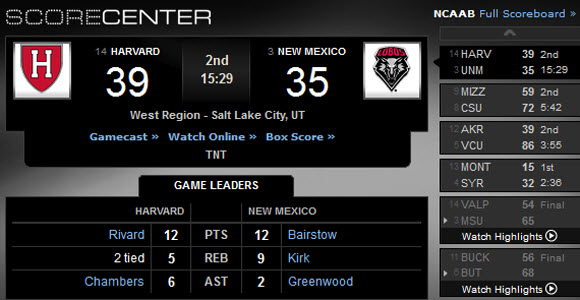
ESPN ScoreCenter App

Use ESPN’s free ScoreCenter app to view the latest scores, read news, and watch video highlights.  iPhone and iPad users can download it free from iTunes.  Android users can grab ScoreCenter from Google Play.

You can check out more free sports related apps in either app store.  Enjoy this year’s March Madness!

Protect Your RapidShare Data

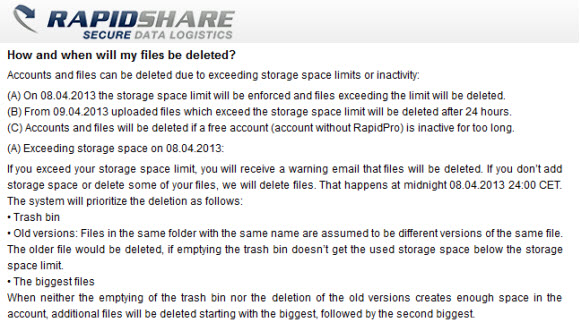
Do you have files stored on RapidShare?  If so move them off immediately.  RapidShare is no longer allowing unlimited free storage.  They are cutting back to 5 GB of free space per user.  Worse yet if you don’t upgrade to a paid account your data will be automatically deleted.  If you need a place to move the data there are several alternatives that offer free online storage space.  Including Google, Microsoft, Amazon and many others.

RapidShare data deletion

It looks like you have until the beginning of April to purchase more storage from RapidShare.  Otherwise you need to move your files off immediately.  They will be sending out warning emails and then deleting the data.  Each user will get 5 GB of free storage.  The confusing part is knowing what data they’ll delete if you’re currently storing more than 5 GB.  Regardless we suggest you move the data off to protect it and then plan for the future.

There are a few Usenet providers that offer free storage to members.  Including NewsDemon, NewsgroupDirect and Giganews.  If you use any of those services then visit their sites and see if you’re eligible for free storage.  Otherwise as we mentioned above there are plenty of options out there to choose from.

Who is Behind Dump Dropbox?

March 14 update: TorrentFreak confirmed that Giganews / Golden Frog founder is behind Dump Dropbox.

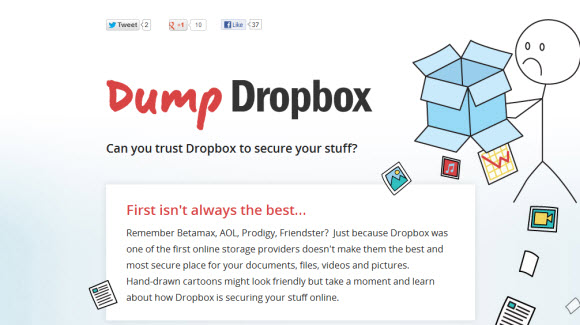
There is some buzz on social media sites today from those trying to figure out which competitor is behind dumpdropbox.com.  If you haven’t seen the site yet it’s a negative campaign against Dropbox.  The question is who is behind the site and were they handing out Dump Dropbox stickers at SXSW?

DumpDropbox.com

Glenn Fleishman @GlennF has been tracking the source of the site and we suspect he’ll be sharing the details of his investigation.  We’re not trying to break the story first.  There are others like Glenn who do investigative research for a living and frankly they are far better at it.  We look forward to reading Glenn’s conclusion.

Our interest is in whether or not Golden Frog is behind the site since we write about their services.  A couple weeks ago we shared an announcement in regards to a SXSW party that Giganews / Golden Frog is throwing tonight.  Since their storage product is aptly named Dump Truck, might they be the source?

We know a few things for sure:

  • Golden Frog, the creators of Dump Truck, are located in Austin
  • Golden Frog hosted a booth at SXSW Interactive in Austin
  • Golden Frog / Giganews is hosting a party at SXSWi tonight for their VyprVPN privacy service
  • Golden Frog uses some of the same points like not outsourcing data or using data deduplication on their site to promote their Dump Truck online storage service – more info
  • Giganews compares their services to Usenet competitors
  • Giganews doesn’t hide behind the comparisons made on their site

Take a look at the Why Giganews page.  You’ll notice a section titled “Not all Usenet is created equal” where Giganews compares their service to others.  It looks like the message is targeted at resellers.

We don’t have any problem with people or companies sharing their opinion as long as they stand behind it.  Whoever published DumpDropbox is hiding behind the message.  Perhaps to build some buzz.  We’ll see.  Hopefully the source will come forward and voice their opinions publicly.  I suspect we’ll find out soon.

Follow us @NewsgroupRevs for more updates.

Best Usenet Apps for Android & iPhone

Over the last year a number of Usenet apps have been released for iPhone and Android devices.  We’ve had the pleasure of testing the new mobile apps and sharing reviews along the way.  Today we’d like to present our favorites in a list of the Best Usenet Apps for Android, iPhone and iPad.  Each has advantages along with a few shortcomings as you might expect from early app editions.  We hope you’ll support the continued growth of the new apps by downloading the latest versions and enjoying the benefit of browsing Usenet on the go.

Best Android and iOS (IPhone, iPad, iPod Touch) Usenet Apps

As we take a closer look at some of the best Android and iPhone apps on the market you’ll want to keep a few things in mind.  First of all you’ll notice that some apps are developed for specific Usenet providers while others are tied to specific newsreaders.  We’ll make sure to point out the requirements and supported services while presenting each selection.  Along with linking to a full review of each Usenet app.

Let’s dive right in and take a look at the best mobile Usenet apps:

1 – EZ Global Search

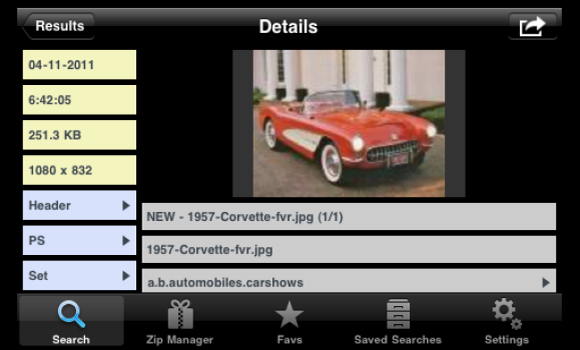
EZ Global Search (full review) is designed for Easynews web Usenet members.  Allowing them to continue the experience of accessing newsgroups while connected from iPhone, iPad or iPod Touch.  Use the app to search Usenet, preview and even add content to Easynews Zip Manager.  The EZ Global Search app is available on iTunes for $2.99.  You’ll need Easynews web access to use EZ Global Search.  If you’re not already a member you can sign up for a 14 day free trial.

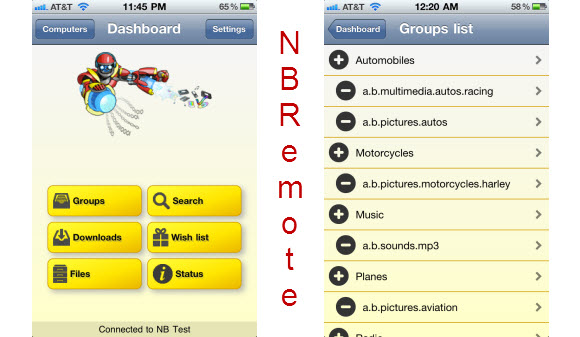
2 – NBRemote

Newsbin Pro users can now enjoy mobile access with their new NBRemote app (full review).  Newsbin Remote Control (NBRemote) is available on iTunes for $2.99 and supports iPhone, iPad and iPod Touch.  With forum members discussing the possibility of a future Android app.  The idea behind NBRemote is simple – control Newsbin Pro remotely from your mobile device.  A goal that NBRemote accomplishes well.  You’ll need a license for Newsbin to enjoy the NBRemote app.  We recommend buying a lifetime key for $20.  Newsbin also offers a 10 day free trial.

3 – SABMobile

SABMobile (full review) is a third-party app developed for the popular open-source SABnzbd newsreader.  SABnzbd Usenet client is free to download and supports Window,s Mac and Linux.  Sabmobile allows you to access SABnzbd remotely and is available for iPhone, iPad nad iPod Touch on iTunes for $2.99.  The app is also available for Android on Google Play for $2.99.  Grab the latest edition of SABnzbd free from sabnzbd.org.  Also check out their other cool add-ons.

4 – EZ Usenet

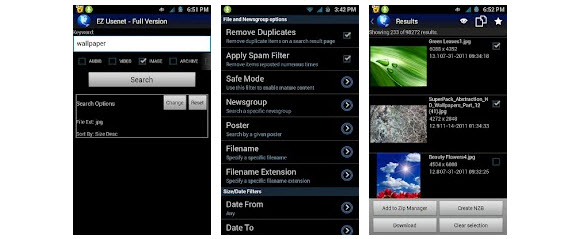
EZ Usenet (full review) is the first of two mobile apps on our list catered toward Android fans that use Easynews to access newsgroups.  The app supports Android and is available on Google Play for $2.49.  First you’ll download the free version of EZ Usenet and then purchase the unlock for $2.49 to unlock all the features and remove advertising from the app.  Once again you’ll need Easynews web access.  If you’re not already a member you can sign up for a 14 day free trial.

5 – Easybrowser

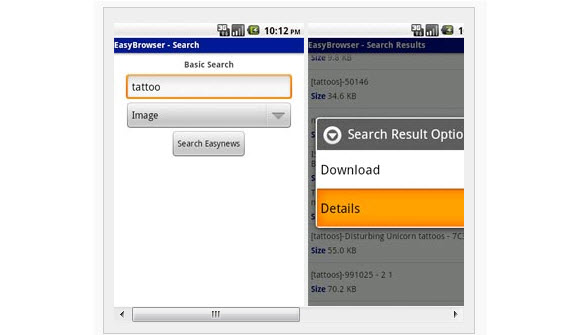
EasyBrowser (full review) is the second mobile app on our list developed specifically for Android fans that use Easynews for Usenet.  The app supports Android and is available on Google Play for $0.99.  First you’ll download the free version of EasyBrowser and then purchase the unlock for $0.99 to unlock all the features and remove advertising from the app.  As you might have already guessed you’ll need Easynews web access.  Non-member can sign up for a 14 day free trial.

That concludes our list of the best Usenet apps for Android, iPhone and iPad.  We hope you’ve enjoyed reading about our favorite mobile Usenet clients.  We look forward to bringing you the latest news along with hands-on reviews of upcoming releases as mobile Usenet apps continue to gain momentum this year and beyond.

Visit Newsgroup Reviews to learn more about mobile Usenet.  For the latest news follow @NewsgroupRevs.

IPVanish Cyber Monday VPN Sale

Have you been considering VPN access to help protect your online privacy or avoid geographic restrictions?  If so Cyber Monday is bringing you the best prices of the year.  IPVanish is offering new members unlimited VPN access from just $4.58 a month.  That’s over 60% off the retail price.  Monthly sign ups receive a second month free.  With deep discounts on quarterly and annual plans.  Visit IPVanish.com during Cyber Monday to sign up.

Since we know some will be wondering whether or not VPN is necessary for Usenet the answer is no.  Yet it compliments it well.  While most Usenet providers offer SSL encryption to secure your connection that doesn’t extend beyond your newsreader.  With a VPN connection you can feel secure while performing other activities online.  Not just web browsing either since VPN protects all your applications.  An advantage over proxies.

There are literally hundreds of VPN services out there and IPVanish is the only one we’ll be mentioning today.  That’s not to downplay others but we’ve seen the best performance from IPVanish.  Since most our readers want and expect high speed connections we think IPVanish is a great fit.  They offer free VPN clients for both Windows and Mac.  Along with support for Linux, iPhone, iPad, Android, DD-WRT routers and more.

For our tech savvy readers IPVanish supports all three major VPN protocols including OpenVPN, PPTP and L2TP.  We use OpenVPN in their client while relying on L2TP or PPTP on mobile devices.  Gamers will appreciate the ability to choose between TCP and UDP connections.  You can switch between servers anytime.  With over 56 servers in 21 countries to choose from.  You can even connect two devices at the same time.

We could continue pouring on the praise for IPVanish but I think you get the picture.  It’s a favorite of ours and we use their VPN service on a regular basis.  You can read our IPVanish review to learn more.  Don’t delay too long though.  Remember to visit IPVanish.com before midnight PST on Cyber Monday to take advantage of the sale.

Join Dick Tater in the Dictator’s Newsgroup

Last weekend we were contacted by Randy Wood.  The author of a new book entitled the Dictator’s Handbook.  Mr Wood has created a series of newsgroups to discuss the topic of dictatorships around the world.  Join the book’s host, Dick Tater, for some lively discussion of tyranny.  Let’s face it.  We’ve all known an aspiring tyrant.  Of course the discussion is more about real world dictatorships.  Visit the Dictator’s news server setup page to learn how to access their newsfeed.  You can also access the discussion through their web interface.

As we mentioned the news server was setup to further the discussion of the topics covered in the Dictator’s Handbook.  We haven’t had a chance to read the book yet but look forward to doing so in the near future.  The topic is right in line with present day events and the discussion of political news around the world.  You can read a sample of the book on the DictatorsHandbook.net or purchase a copy at Amazon for $14.99.

Visit Newsgroup Reviews to learn more about Usenet.  Help protect your online privacy with a VPN service.

UCLA Usenet Restricted to Campus Network

UCLA will be making some changes to their Usenet service this weekend.  After their July 1st update access will be restricted to the UCLA campus network.  Users who wish to access newsgroups from off campus will need to first connect to the UCLA VPN.  The changes will take place between 12:01 am and 1:00 am Sunday, July 1st.  You can visit the BOL maintenance page for more details including Usenet and VPN setup instructions.

Some might find the UCLA update confusing.  As we started by saying the Usenet service will be restricted to their on campus network and then mention use of the UCLA VPN when off campus.  Basically UCLA’s VPN allows you to connect to the UCLA network from off site.  Granting you an IP address just as if you were sitting on campus.  The same way personal VPN services assign IP addresses from around the world.

Once you’re on campus or connected through the VPN you can access the Usenet service using your email address.  The UCLA news server (news.ucla.edu) does not require authentication.  However it will only be accessible if you have a UCLA IP address.  If you have questions about setting up their Usenet access visit the UCLA news server page.  Bruin Online also has a page dedicated to helping you setup UCLA VPN access.

Visit Newsgroup Reviews to learn more about Usenet. Follow us @NewsgroupRevs for the latest news.

Microsoft Cuts Price on Xbox 360 Console

Microsoft has cut the price of their Xbox 360 250 GB console by $50.  Taking the price from $299 down to $249.  We were hoping they would also reduce the price on the 4 GB system but it doesn’t appear that happened.  Making the choice between versions a more difficult decision.  With the 250 GB a much better value in comparison to the 4 GB.  You can visit the Microsoft Store to buy the 250 GB Xbox 360 for $249.99.

Here’s a list of the items that come with the Xbox 360 250 GB console:

  • Xbox 360 250 GB S console
  • 250 GB removable hard drive
  • Xbox 360 headset
  • Wireless headset
  • Composite A/V cable
  • One-year limited warranty
  • One-month Xbox Live Gold membership

Those interested in Kinnect will end up paying $149 for the addition.  We looked to see if bundles were less but the Xbox 360 250 GB with Kinnect is priced at $399.99.  Meaning whether you buy in bundle or separate the price is the same.  You might keep an eye on vendors like Amazon and Best Buy for special offers.

Update: Amazon is offering the Kinnect sensor with Kinnect Adventures game for $136.99.  A better price that that offered directly from Microsoft.

Visit Newsgroup Reviews to learn more about Usenet.  Follow us @NewsgroupRevs for the latest tech deals.

Free Online Storage for Usenet Downloads

Last week’s launch of Google Drive got us thinking about online storage for Usenet.  A topic we’ve written about in the past as providers like NewsDemon, NewsgroupDirect and Giganews offer storage as part of their Usenet packages.  Now a days though it’s getting easier to find free online storage in larger amounts.  With services like Google, Mocrosoft, Apple, Amazon, Dropbox, Mozy and SugarSync offering free online backup space.

If your Usenet provider offers secure online storage then by all means take advantage of that first.  Some might also consider backing up their content to Usenet.  While that is certainly an option we prefer these solutions.  As they allow you to store your Usenet downloads and personal files securely without having to post them.

Free online storage offered by Usenet providers:

  • NewsDemon – 30 GB storage with Usenet and newsreader for $9.99 a month
  • NewsgroupDirect – 30 GB storage with Usenet and client for $16 a month
  • Giganews – 30 GB storage with Usenet, client and VPN for $34.99 a month

Those using other Usenet services can look elsewhere for online storage.  As several well known vendors offer free space to backup your files online.  Offering the advantage of safely storing your Usenet downloads along with access from anywhere and in many cases the ability to publicly or privately share your files.

Here are several online backup services that offer free storage.  Listed in alphabetical order:

We could list more free storage offers but these are some good options to get you started.  Please let us know if we missed any of your favorite services.  Otherwise you can grab around 50 GB of online space from those listed above.  The free storage amounts listed are baseline.  Several offer promotions for more free space.

Visit Newsgroup Reviews to learn more about Usenet.  Follow us @NewsgroupRevs for the latest deals.