NewsLeecher Version 5 Beta 7 Released

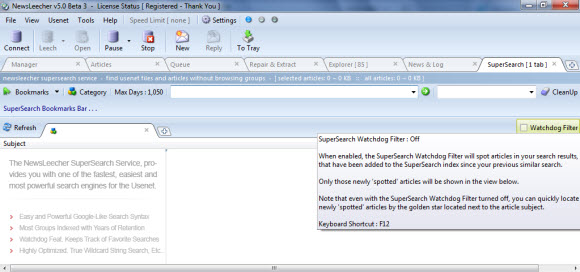
NewsLeecher released a new beta of their popular Usenet client on October 24th.  Since then we’ve had a chance to run it through the paces and enjoy some of the new features.  The version 5 beta 7 release includes some cool new features like ‘Repair & Extract Destination Manager’.  Along with ‘SuperSearch It’ for quick, refined searches.  Grab the latest version 5, beta 7 release from the NewsLeecher download page.

Stay tuned as we’ll share our impressions of the new NewsLeecher features along with screenshots and more detailed information later this week.  In the meantime download the new beta and let us know what you think.  Here’s a full list of features in v5 beta 7 from the NewsLeecher release log:

NewsLeecher v5.0 Beta 7
Release Date: 2011-10-24 13:00:05
+: ---------------------------------------------------------------
   -- Larger Feature Addition - R&E Destination Manager -- -------
   ---------------------------------------------------------------
   A new feature named "Repair & Extract Destination Manager" has
   been implemented. This feaure makes it possible to tell
   Repair & Extract where to extract specific downloaded articles,
   based on customizable keywords matched against the articles
   subjects. The feature replaces the current settings used to
   specify where R&E should extract archives, but we've tried to
   make it backward compatible, so your R&E extract settings
   remain intact, until you decide to change them through the
   newly implemented manager.
+: ---------------------------------------------------------------
   --[ Larger Feature Addition - SuperSearch It ] ----------------
   ---------------------------------------------------------------
   A new feature named SuperSearch It, has been implemented for
   all tab views in NewsLeecher. The feature makes it very fast
   and easy to use SuperSearch for searching specific groups,
   article subjects and poster names. The feature also makes
   it very fast to browse entire groups through SuperSearch,
   without having to fetch headers for the specific group.
   Feature can be accessed by the 'Flash Icon' buttons, or
   the F4 keyboard shortcut.
+: Implemented an option to completely hide the 'Posting View',
   when no articles are queued to be posted. The option can be
   turned on / off from by clicking the button, right-most on
   the transfer queues toolbar.
*: We have begun to convert various code parts used in
   NewsLeecher, in preparation to port the application to Mac OS
   X. Note that these are *very* *very* early conversion tasks. A
   fully funtional NewsLeecher OS X port still lies quite a while
   into the future.
*: Visual interface consistency improvements have been
   implemented.
*: Smaller improvements here and there.

Visit Newsgroup Reviews to compare Usenet clients and follow us @NewsgroupRevs for the latest news.

Alternative Usenet Search Engines

What happens when your favorite Usenet search engine or NZB site goes down?  Where do you turn?  Over the last few days a lot of Usenet fans have been discussing where to find newsgroup content when leading sites like NZBMatrix are down.  Whether down indefinitely like Newzleech or temporarily as was the case when NZBMatrix recently upgraded servers.  Either way users are left seeking alternatives.

We’re not suggesting you turn away from sites like Binsearch, NZBMatrix and Mysterbin.  As we enjoy them as well.  Instead these alternatives are great to have when your favorite site is down.  Luckily there are some pretty good options available.  In fact we’ve been enjoying the Usenet search feature inside of the Newshosting client along with Newsbin and the NewsLeecher SuperSearch feature.  Integrated search is definitely convenient.

Newshosting Client with Built-In Usenet Search

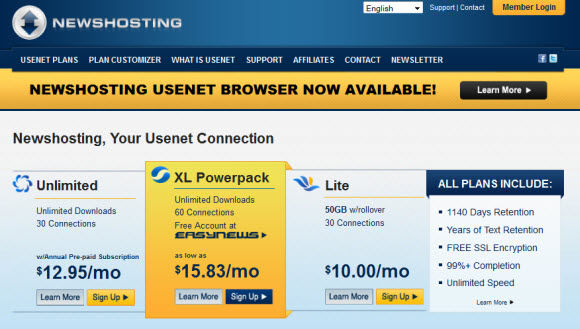
Newshosting is our favorite alternative to sites like Binsearch and NZBMatrix.  Why?  Because they have a number of search engines built into the free Usenet client.  Including Binsearch, Nzbindex and Nfonews.  Along with their own Newshosting search engine.  Giving you the flexibility to find Usenet content through different sources.  Then you can let the Newshosting Usenet browser download, repair and extract the content.  Newshoting includes the newsreader free along with unlimited Usenet access for $9.99 a month or $99 a year.  We highly recommend their service.

Newsbin Pro with the Usenet Search Feature

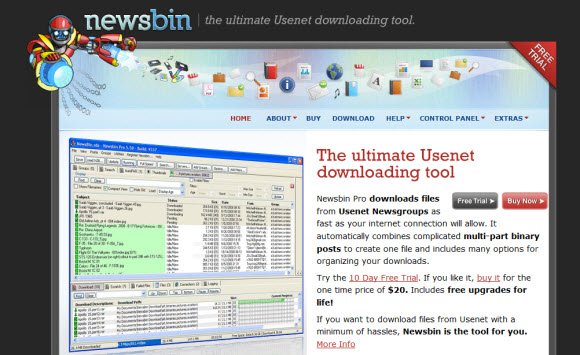
Newsbin Pro has been one of our favorite newsreaders for many years now.  Part of the reason is their Newsbin Internet Search feature.  Which is a built-in Usenet search engine.  You can filter by newsgroup, file size and age just to name a few.  The search feature is an additional cost.  With two options to choose from.  They have a Standard search package which includes 500 searches a month for $2.50 along with an unlimited option which costs $5 a month.  New users can download a free trial of Newsbin Pro which will also allow you to test the Newsbin search functionality.

Newsleecher with the SuperSearch Feature

We’ve been using Newsleecher with the SuperSearch feature for a long time as well.  It has some newer advanced features like ‘SuperSearch It’ which is great for finding content in a specific groups or even browse through the group without downloading headers.  Newsleecher is similar to Newsbin in that the search feature costs extra.  New users can purchase Newsleecher along with the SuperSearch feature for $2.99 a month or $29.99 a year.  That includes all future releases and beta downloads.  You can also download a free trial of Newsleecher to test the reader.

The Newshosting client with built-in Usenet search is our favorite because it’s free to members and offers multiple engines.  You really can’t go wrong with any of the options listed above.  Especially when your favorite site is down or you just want the convenience of searching and downloading within the newsreader.

Visit Newsgroup Reviews to compare Usenet search engines and follow us @NewsgroupRevs.

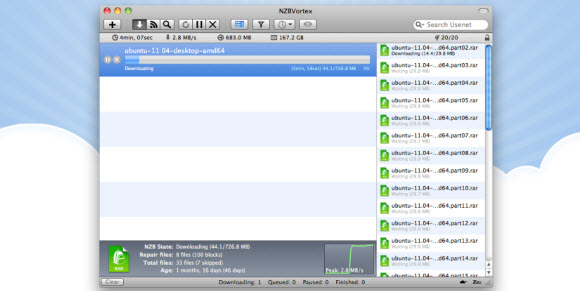
NZBVortex 2.5 Simplifies Adding RSS Feeds

On November 2nd NZBVortex released the latest version of their popular Mac Usenet Client.  NZBVortex version 2.5 has a number of tweaks along with better support for French Canadian renamed file uploads.  In addition to a cool new search screen for adding RSS feeds.  You can purchase a license for $19.95 to open up all the bells and whistles including advanced post processing and support for multiple news servers.

Here’s a full list of NZBVortex 2.5 features taken directly from the NZBVortex site:

  • Support the French/Canadian renamed file uploads and improve other funcky nzbs
  • Better support misnamed files during par2 phase
  • Introduce a “configure sleep” balloon while clicking the Zzz button
  • Show a balloon for the hard to find (seems) sleep and speed limit buttons
  • Lion resume fullscreen wrong screen dimensions.
  • Add a low CPU priority mode option for postprocessing
  • Press SPACE to pause/resume marked downloads.
  • “Reset Monthly server volume” doesn’t work when “volume limit warning” is disabled
  • Server traffic reset button doesn’t update UI right away
  • A reminder on launch that speed limit is use
  • Show “speed limit” balloon above speed limit mode button when pressed
  • Detect “wake up computer” timeout – make it little more snappy
  • Application fade in animation glitch
  • Button to add search query as RSS watch
  • Merging nzb with another already imported paused nzb should not start download.
  • Wildcard support rss / group matching / cleanup (regex using slash)
  • Right click -> make this nzb the next to download
  • Delete to trash with “Yes and Delete Files” or at least make it optional.
  • Episodes watch values not saved following power cut
  • Move out all other stuff from ProcessSpeed thread
  • Rename files if the nzb contains other filenames compared to the par2 set content
  • Drop NZB after itself (blue line bottom of itself) moves moves below the next NZB
  • Franticly clicking SSL checkbox might cause a crash during test server settings (NSThread)

If you’re a Mac fan and haven’t had a chance to check out NZBVortex newsreader yet then visit their site and download a trial copy.  The client is very intuitive and easy to use.  It definitely has a nice Mac feel to it.

Visit Newsgroup Reviews to compare Mac Usenet clients.  Follow us @NewsgroupRevs for the latest releases.

Newshosting Client : SafeSearch and Download Folders

Earlier this week Newshosting released version 1.1.0 of their popular Usenet client.  Since then we’ve had a few readers ask how the new features are configured.  Rather than answer via email we thought it better to share the tutorial in a post.  That way others can benefit as well.  We’ll be covering the steps to configure SafeSearch.  Along with instructions for customizing download folders.

Enjoy unlimited Usenet and free Newshosting client access for $9.99 a month or $99 a year.

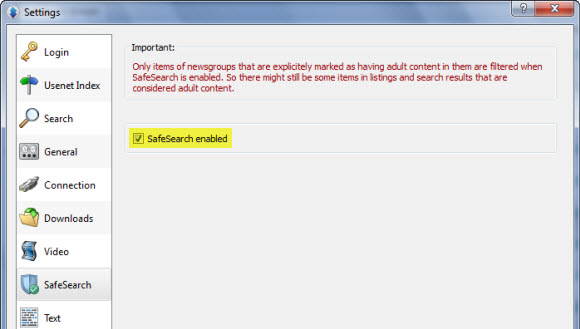
Configuring SafeSearch in the Newshosting Usenet Client

SafeSearch is a new feature in the Newshoting client that helps to filter out adult content.  To enable the SafeSearch option from within the newsreader simply click on Options and then Settings.  Then click on the SafeSearch tab.  To enable SafeSearch simply check the box.  The result is shown below.

Take notice of the statement at the top of the screen shot.  Because “Only items of newsgroups that are explicitly marked as having adult content in them are filtered when SafeSearch is enabled.  So there might still be some items in listings and search results that are considered adult content“.

Enjoy unlimited Usenet and free Newshosting client access for $9.99 a month or $99 a year.

Newshosting Client – Configuring Download Folder Options

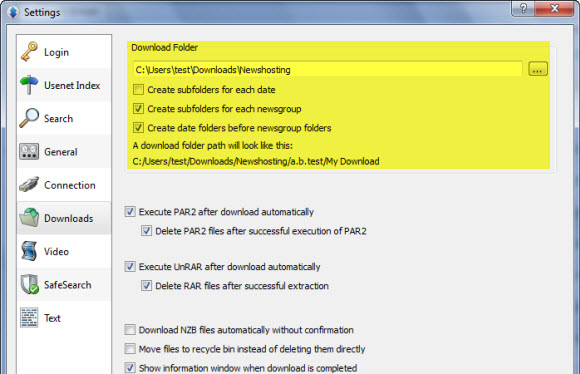
You have a few options when configuring how the Newshosting client handles download folders.  With some nice ways to organize downloads.  To access the download folder settings once again click on Options and then Settings.  Then click on the Downloads tab.  The following screen will be displayed.

Take notice of the highlighted section for download folder options.  Starting with the path which is configurable.  Once you decide where you want downloads stored look over the additional options:

  • Create subfolders for each date
  • Create subfolders for each newsgroup
  • Create date folders before newsgroup folders

Check the boxes based on your download folder preferences.  You’ll also notice options below for controlling how the Newshosting client handles PAR2 repairs and auto-unRAR functions.

That’s all there is to it.  You can easily enable the SafeSearch feature (disabled by default) and configure download folder options within a couple minutes.  New members will be happy to know that the Newshosting client comes pre-configured.  With addition tweaks like those above that further enhance your experience.

Enjoy unlimited Usenet and free Newshosting client access for $9.99 a month or $99 a year.

Visit Newsgroup Reviews to learn more about Usenet.  Follow us @NewsgroupRevs for the latest specials.

Newshosting Usenet Client v1.1.0 Released

Earlier today Newshosting released a new version of their free newsreader.  Version 1.1.0 of the popular Usenet client includes some nice features.  For those who haven’t tried the reader Newshosting is offering a 14 day free trial.  Better yet our visitors can take advantage of the NH Unlimited special and enjoy unlimited Usenet with SSL encryption and free access to the Newshosting v1.1.0 client for just $9.99 a month or $99 a year.

We’ve had several users email us bragging about how much they like the Newshosting client.  So the v1.1.0 update should only enhance the experience.  For example versioin 1.1.0 introduces a feature called SafeSearch.  Enabling SafeSearch allows you to filter adult content across file groups, image listings and search results.  You can easily enable the SafeSearch feature from within the browser’s settings.

Newshosting Client v1.1.0 – New Features

  • SafeSearch – help filter out adult content (for all you horndogs the SafeSearch feature is optional)
  • Download folders – dates and/or newsgroup subfolders are now created in the download folder.  Also configurable.
  • Minimize-to-tray option

In addition to the v1.1.0 features here are some more highlights of the Newshosting client:

  • Client comes preconfigured
  • Quick file search
  • File preview + automatic thumbnails – very cool feature!
  • Sort groups by file type (image, audio, video, etc)
  • Text and binary newsgroup support
  • Post to text groups directly
  • Auto-unrar and auto-par – no need for WinRAR or QuickPAR

Read our Newshosting newsreader review to learn more about the client.  Existing members can update to version 1.1.0 from within the client or download a new copy from the Newshosting control panel.  While new subscribers can save up to 44% through one of our Newshosting specials.

Visit Newsgroup Reviews to learn more about Usenet.  Follow us @NewsgroupRevs for the latest offers.

Beware of Infected RAR Files : WinRAR Exploit

According to a Newsbin tweet they are seeing new Usenet posts that take advantage of an old WinRAR exploit.  One that Trend Micro covered in 2007.  It affects WinRAR version 3.50 and earlier.  So check your WinRAR version and upgrade if necessary.  If you’d rather seek alternatives then look at newsreaders like Newsbin and the Newshosting client that include auto-PAR and auto-unRAR features.  Newsbin offers a 10 day free trial and Newshosting offers our visitors unlimited Usenet with free newsreader for just $9.99 a month or $99 a year.

According to the Trend Micro post:

the said exploit (detected as TROJ_RDROPPER.A) arrives as a malicious .RAR file. Once the said file successfully exploits the WinRAR flaw, it proceeds to drop the file %User Temp%WINRAR.EXE, which is detected by Trend Micro as BKDR_DARKMOON.AH. The dropped backdoor, in turn, opens a random port and allows remote code execution by a malicious user.

So again please check your version of WinRAR to ensure you are running a version higher than 3.50.  If not upgrade or consider alternatives.  Some of the leading newsreaders like the Newshosting client, SABnzbd, Newsbin, Newsleecher, Binreader and a few others take care of the unRAR process for you.  Without the need for WinRAR.  Visit our newsreader section to learn more and compare Usenet clients.

Visit Newsgroup Reviews to learn more about Usenet.  Follow us @NewsgroupRevs for the latest news.
SABnzbd Newsreader Celebrates 3 Million Downloads

It’s no surprise to most that SABnzbd is one of the best Usenet clients around.  Given the quality and compatibility of the free, open-source newsreader.  Just how popular is SABnzbd?  How about 3,097,354 downloads as of this post.  That’s impressive!  The download numbers are snowballing so we suspect they’ll be hitting 4 million before you know it.  The project hit 2 million downloads in 3 years – on November 21, 2010.

SABnzbd is a free download for Windows, Mac, Linux and more.  So if you haven’t tried the web newsreader yet visit the SABnzbd download page.  In addition to the SABnzbd client the open-source platform allows for some excellent add-ons and scripts like CouchPotato, Sick Beard, SABMobile, nzbdStatus and myNZB.

SABnzbd is one of our favorite Usenet readers.  You can learn more about the popular client by reading our SABnzbd 0.6 review.  Better yet download SABnzbd for yourself and let us know what you think.

Visit Newsgroup Reviews to learn more about Usenet.  Follow us @NewsgroupRevs for the latest news.
Newshosting Usenet Client Free For All Members

Newshosting is now ready to roll out their free Usenet client to all NH members.  After a month or so of beta testing the Newshosting team announced earlier this week that the newsreader is available to all subscribers.  If you’ve been waiting to try the new client then now is the perfect time.  We enjoy the features and think you all as well.  New members can sign up for our Newshosting unlimited special – $9.99/mo. or $99/yr.

Current Newshosting members can log into the control panel and download the client directly from there.  With Windows, Mac and Linux versions available.  All three versions of the newsreader are free for members.  With features like Usenet search, auto-PAR, auto-unRAR and video previews the client is one of the best around.

We would encourage those seeking Usenet access to seriously consider Newhosting.  You can visit Newsgroup Reviews to compare all the Usenet providers and learn more about newsgroups.  You’ll find that Newshosting (along with a handful of other services) are leading the industry in value.  Meaning the best features and reliable Usenet access for the cost.  With the newly released client, Newshosting is poised to kick some ass.  Other popular services like UseNetServer and Astraweb should watch out as Newshosting is quickly gaining ground.  Want to the try the new client free for 14 days?  Sign up for their two week free trial.

—————

Here the official press release from Newshosting:

Newshosting Announces Release of Newshosting Usenet Client

ASHBURN, Va., Sept. 20, 2011 /PRNewswire/ — Newshosting, the recognized leader in Usenet newsgroup access, today announced the first official release of the Newshosting Usenet Client. It is immediately available in the Newshosting Control Panel, for both current and new customers, at no additional charge. Versions are available for Windows, Mac and Linux.

The Newshosting Usenet Client allows users to search, browse and preview Usenet content with unprecedented ease. Many Usenet clients require a complicated configuration process. With the Newshosting Usenet Client, there is nothing to configure, just a simple login.

Searching has never been easier. Keyword searches with instant results over the entire depth of Newshosting’s 1131 day retention allow you to access thousands of files you may have missed with other Usenet clients. Organizing search results has been simplified with filters to sort by file-type. Video and image thumbnails allow you to preview files before downloading.

The client includes several more features such as: Auto-Repair, Auto-Unpack and Automatic Updates. Auto-Repair checks and repairs all downloads before the complete, which means no more broken downloads. Auto-Unpack will unpack, or unzip, files to your downloads folder automatically.

In just two years, Newshosting has seen retention rates increase from 250 days to 1131 days. Technical and infrastructure enhancements, including recent storage and network upgrades to its North American and European NNTP server farms, have allowed Newshosting to support and spool up to a full 1131 days binary retention and offer over 2 years text retention with 99%+ article completion and lightning-fast, secure first class Usenet access.

—————

Newshosting NGR special marks their lowest price ever.  With Newshoting offering unlimited Usenet access + newsreader for $9.99 a month or $99 a year.  Expect the best from Newshosting.  From unlimited Usenet downloads and uncapped speeds, Newshosting Usenet client, 99% completion, 256-bit SSL and server farms in the US and Europe.  All for just $9.99 a month or $99 a year for our visitors.  Visit our NGR Newshosting special and start downloading in minutes!

Newsbin Pro 6.1 Released + Newsbin Remote Control

Newsbin Pro has released a new version of their popular newsgroup reader.  Newsbin Pro 6.1 is available to download directly from the Newsbin.com site.  Those who would like to test out the newsreader can download a 10 day free trial.  Version 6.1 of Newsbin Pro Usenet client includes better RAR processing and some cosmetic changes.  Newsbin has also released a remote control interface and is working on some more cool apps.

Here is a list of new features in Newsbin Pro 6.1:

  • Bug fixes
  • Changed icons to expanded compacted posts from arrows to more common + and signs.
  • Hooked up retries for failed header downloads.
  • Hooked up speed and time remaining display when you dwell over the taskbar icon.
  • Load drop down in the post list tab goes back 4 years now.
  • Now only displays the MOTD if there is something new. Unregistered shows the MOTD all the time.
  • Hooked up the Ctrl-G shortcut to perform a header update.
  • New TCP commands for the Remote Control interface: Interface Spec | Remote Control Forum

We’re excited to see Newsbin Remote Control in action.  The Newsbin team is currently beta testing an iPhone / iPad app and they are developing an Android app as well.  You can learn more about the project by visiting their SourceForge page or the Newsbin forum.

Visit Newsgroup Reviews to learn more about Usenet.  Follow us @NewsgroupRevs for the latest news.

Newsleecher 6 In Development + Usenet Service

It’s been awhile since Newsleecher released version 5 of their popular newsreader.  From today’s news it appears they have been busy and are getting ready for some big updates.  Including the next v5 beta and development on Newsleecher version 6.  In addition to something completely new.  Newsleecher plans to roll out their own Usenet service along with a new website design.  No timeline was given for the projects.

Here’s the message posted on the Newsleecher site:

Wow, time flies, and it has been a long time since the previous NewsLeecher release.

But we can assure you that the NewsLeecher project isn’t going away anytime soon. Quite the opposite actually.

We are currently working on the next beta, and we have also initiated the development of NewsLeecher V6. The next beta of NewsLeecher will be out soon.

Besides that, we are progressing on a major overhaul of the NewsLeecher website, as well as a new Usenet service, which we will introduce together with the new website.

Good times ahead for NewsLeecher 🙂

We look forward to seeing the next NL v5 beta and getting our hands on the first Newsleecher 6 beta.  Hopefully in the not too distant future.  As the development of Newsleecher is always fun to follow.  We have enjoyed the version 5 release.  Especially the multi-tabbed Supersearch and Watchdog features.

We find the upcoming Newsleecher Usenet service of particular interest as well.  This news comes a year after Giganews releases Mimo and a month after the Newshosting client release.  Newshosting offering a free Usenet client and unlimited Usenet access for $9.99 a month has to put some pressure on premium clients like Newsleecher and Newsbin Pro.  Both of which cost around $30 a year with the search feature.

When you break down the cost, a service like Newshosting that offers quality Usenet + a free client with premium features for less than $10 a month is really hard to beat.  At the moment customers have to decide whether or not Newsleecher is worth $29.99 a year (with SuperSearch) on top of a Usenet subscription.  Considering Newshosting also offers $99 annual accounts their newsreader is bound to make a big impact on the market.  Can Newsleecher do the same with their new Usenet offering?  We’ll find out soon enough.

Newsleecher won’t be the first client to offer Usenet service.  Just as Newshosting isn’t the only provider to offer a reader.  Both scenarios have the potential of doing quite well.  Which would you prefer?  Knowing the reliability track record of the Usenet service or the quality track record of the client?

Here are a few Usenet providers who currently offer newsreaders.  Either their own or free third-party clients.  All of the prices listed are special offers on unlimited Usenet with free clients.  Some offer addition features.

In addition the following newsreaders offer Usenet service:

As you can see Newsleecher will be joining a pretty distinctive group.  Offering Usenet service with a client or vice versa.  We look forward to learning more in the near future.  As always stay tuned for the latest updates.

Visit Newsgroup Reviews to learn more about Usenet.  Including newsreader reviews, Usenet providers reviews, guides, free trials and special offers.  Follow us @NewsgroupRevs for the latest Usenet news.