Giganews VyprVPN 2.0 Client

Giganews Diamond and Platinum members now have access to the new VyprVPN 2.0 apps.  Golden Frog released them yesterday after a month or so of beta testing.  You’ll notice a fresh new user interface design.  Along with some advanced features like the new speed graph and IP location map (for Android users).  You can read the related Giganews post to learn more about VyprVPN 2.0.  Including links to download the client.
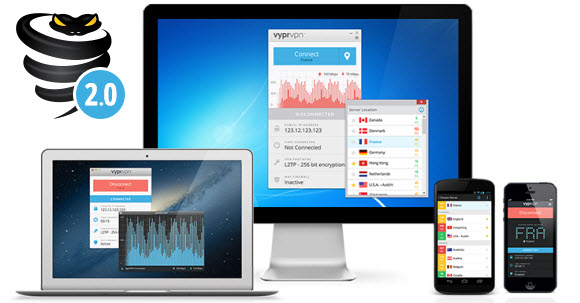
Giganews VyprVPN 2.0

You can access VyprVPN as a Giganews member if you have one of their top tiers:

  • Giganews Diamond – $29.95 a month with VyprVPN Pro
  • Giganews Platinum – $19.95 a month with VyprVPN Basic

Here are the differences between the two VPN plans:

  • VyprVPN Pro – 2 connections, OpenVPN, PPTP, L2TP, NAT firewall
  • VyprVPN Basic – 1 connection, PPTP

You can visit our VPN review site to see how VyprVPN stacks up against other leading providers.  If you already have a Giganews Diamond or Platinum account then we definitely suggest you take advantage of VyprVPN.  I think you’ll find it to be on par with other leading privacy services.  Their 2.0 client release adds some additional features.  We like the new user interface design and speed graph.  Visit Giganews.com for more info.

NewsDemon Holiday Giveaway

It’s that time of year again.  Walking outside you can tell the holidays are just around the corner.  With temperatures dropping along with the smell of the trees and fires in the air.  NewsDemon is kicking off their holiday season this year with a giveaway.  As a thank you to new and existing members they are giving away a number of prizes including a Roku 3, Chromecast, Amazon gift card and a year of unlimited Usenet.

NewsDemon Holiday Giveaway

The rules are simple.  The promotion started on November 13th and will run through November 20th.  During that time the NewsDemon team will draw one winning name each day.  That person will take home one of the prizes listed above at random.  Then on November 20th a grand prize winner will be chosen.  They will receive all four prizes.  If you’re not already a member visit NewsDemon.com and sign up for your chance to win.

NewsgroupDirect November Terabyte Tuesday

NewsgroupDirect is at it again.  As they just launched their November Terabyte Tuesday promotion.  Allowing new and existing members to buy 1 TB non-expiring block accounts for 65% off.  So you pay $35 rather than $100 for a terabyte of Usenet access.  To be used anytime.  An excellent value at just 3.5 cents a gigabyte.  Sign up before 12 AM EST on November 14th to take advantage of the Terabyte Tuesday promotion.

What’s included in the NewsgroupDirect Terabyte Tuesday promotion?  First you receive a 1 TB block of Usenet downloads.  The block is non-expiring so you can use it until the terabyte is depleted.  NGD has news servers in the U. S. and Europe.  With free SSL and up to 50 connections.  They currently support over  1,900 days of binary retention and growing.  Along with a discount on personal VPN access from Ghost Path.

Visit Newsgroup Reviews to learn more about Usenet.  Follow us @NewsgroupRevs for the latest deals.

—————

Here’s the scoop directly from the NewsgroupDirect blog post:

It’s Terabyte Tuesday, and that means the best deal in usenet is back! For the next 48 hours we’re selling our 1 TB blocks for $35. That’s a savings of $65 per block. This edition of Terabyte Tuesday will last for 2 days, from 12 AM EST on November 12 until 12 AM EST on November 14.

Our 1 Terabyte usenet block has access to our world-class retention (currently over 1,915 days), speed, completion, VPN access, and our industry-leading customer service. NewsgroupDirect blocks never expire, so you can buy as many blocks as you want and never worry about losing them. NewsgroupDirect blocks are also shareable, so you can buy a block and share with your friends.

SnelNL Usenet Review

We recently had a chance to test the SnelNL Usenet service.  SnelNL is a Dutch newsgroup provider with servers in Europe and the United States.  They developed a streaming Usenet client for both Windows and Mac.  We tested the newsreader on Windows 8 and it worked well.  In a moment we’ll share our experience with the service.  If you’d like to try it for yourself they offer a 3 day free trial with up to 1 GB of usage.

After signing up for a free account we downloaded the SnelNL Windows client software.  The install was simple.  You just enter the username and password provided in their welcome email along with the server location you’d like to connect (Europe or US) and whether or not you want SSL enabled.  This information let’s the client automatically configure the correct news server address and port number.

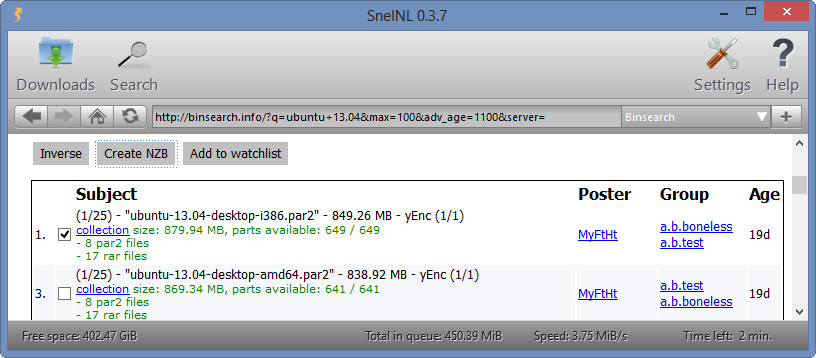
We enjoyed using the SnelNL client.  You can easily search for content through a web interface with shortcuts to sites like Binsearch.  Here’s an example.  We used the client to search for a Ubuntu release.

SnelNL search engine

Once we found the Ubuntu 13.04 distro we were looking for we simply clicked on the Create NZB button.  That moved the NZB file into the SnelNL client queue.  You can access the queue by clicking on Downloads.

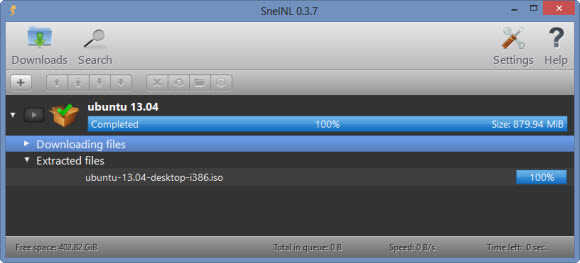
SnelNL Ubuntu download

After the Ubuntu image downloaded the SnelNL client automatically unpacked the contents and deleted the file parts.  Leaving us with our Ubuntu 13.04 ISO.  The client also has the ability to stream audio and video files.

There isn’t much more to say about our testing.  The service worked well.  We didn’t have any problems along the way.  Performance was good and the client was easy to use.  We were able to install the software, find our Ubuntu distro and download it within just a few minutes.  We should also mention that if you have a favorite newsreader they provide all the information you’ll need to connect.  Including news server and port numbers.  They provide set up guides for Spotnet (Dutch software), GrabIt, NewsLeecher, Alt.binz and SABnzbd.

Here’s a quick look at the SnelNL account options and pricing:

When we signed up they were offering a one-time discount of €1 off any account.  They also have discounts on 6-month and annual sign ups.  Along with a 3 day, 1 GB free trial for all new members.

Here’s the news server info for those who want to set up SnelNL with a third party Usenet client:

  • EU Server: news.snelnl.com (port 119)
  • SSL EU Server: ssl-news.snelnl.com (port 563)
  • US Server: news2.snelnl.com (port 119)
  • SSL US Server: ssl-news2.snelnl.com(port 563)

We hope you enjoyed our review.  Visit our Dutch Usenet page to compare SnelNL to other European providers.

UseNetServer Fall Special

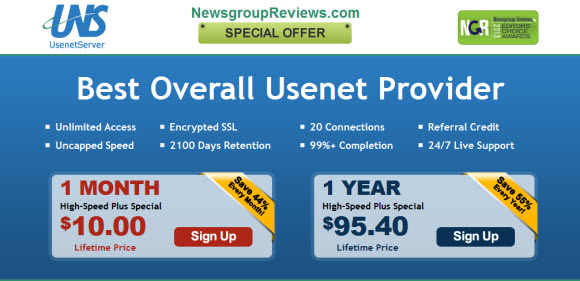
Halloween just ended and the holiday season is just around the corner.  It’s starting to get cold outside which means more time behind the computer.  To help celebrate the season UseNetServer is offering a promotion.  In addition to their already discounted price of $10 a month for unlimited Usenet access, UNS is giving new members an additional $5 off the first month.  Visit their UseNetServer special page by Nov. 30th to save.

UseNetServer Fall Special

UNS has been one of our favorite services for years now.  They offer a ton of value for the price.  Starting with over 1,900 days of binary retention and growing.  Not only do members gain unlimited access to their news servers in the United States and Europe for $10 a month.  They also get to use their UNS Global Search feature which helps you easily find Usenet content.  They round out the offering with 20 connections and free SSL.

There isn’t much more to say about UNS.  They have all the bases covered.  Just plug their news server address into your favorite newsreader and away you go.  If you don’t have a Usenet client and want a service that offers one we suggest you take a look at Newshosting.  Otherwise grab a UseNetServer account in November for just $5 the first month and then $10 a month thereafter.  The lowest price we’ve ever seen UNS offer.

You can read our UNS review to learn more about the service or visit their November special page to save.

Best Usenet Specials

Why overpay for Usenet access when leading Usenet providers offer lifetime deals on unlimited Usenet access for under $10 a month.  If you’re paying more for Usenet you’ll definitely want to check out these specials from leading Usenet providers including UseNetServer, Newshosting, NewsDemonAstraweb and Easynews.  We’d like to thank each newsgroup service for offering our Newsgroup Reviews (NGR) visitors special discounts.  All of the deals listed below are recurring so enjoy the savings for the life of your account.

Newshosting – Usenet + Client + Search for $9.99/mo. or $99/yr.

Newshosting Unlimited Usenet Deals

Newshosting NGR special marks their lowest price ever.  With Newshoting offering unlimited Usenet access + newsreader for $9.99 a month or $99 a year.  Expect the best from Newshosting.  From unlimited Usenet downloads and uncapped speeds, Newshosting Usenet client, 99% completion, 256-bit SSL and server farms in the US and Europe.  All for just $9.99 a month or $99 a year for our visitors.  Visit our NGR Newshosting special and start downloading in minutes!

UseNetServer – Unlimited Usenet + Search for $10/mo. or $95/yr.

UseNetServer

The UseNetServer (UNS) $10 a month and $95 yearly Usenet specials are both excellent values.   Especially for a top tier provider like UNS.  The service offers unlimited Usenet downloads and uncapped speeds (with 20 connections), 99% completion rate, free SSL and news servers located in the US and Europe.  Along with free Usenet search (UNS Global Search).  All for just $10 a month or $95 a year for our visitors.  Visit our NGR UseNetServer special and enjoy the savings!

NewsDemon – Unlimited Usenet + Online Storage for $10

NewsDemon $9.99 deal

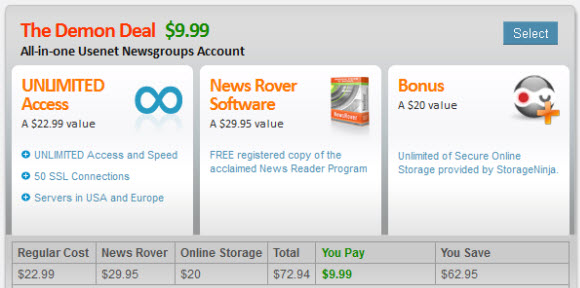
The NewsDemon Demon Deal includes unlimited Usenet access plus a free copy of News Rover newsreader and 30 GB of online storage for $10 a month.  NewsDemon offers unlimited Usenet downloads and uncapped speeds (with 50 connections), 99% completion rate, free SSL and news servers located in the US and Europe.  Along with a free Usenet client and online storage.  All for just $9.99 a month for our visitors.  Visit our NGR NewsDemon special page for more details.

Easynews – Unlimited NNTP Usenet Access for $9.95

Easynews

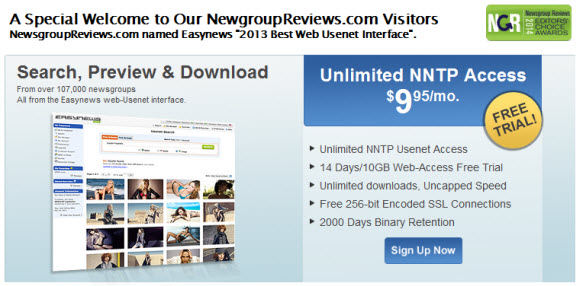
The Easynews NGR special includes $9.95 unlimited Usenet access.  Easynews is best known for their web interface.  Yet they also offer one of the best NNTP Usenet server platforms.  From unlimited Usenet downloads and uncapped speeds (with 20 connections), 99% completion, 256-bit SSL and server farms in the US and Europe.  All for just $9.95 a month for our visitors.  Sign up via our NGR Easynews special page and also enjoy two weeks of free web interface access.

ThunderNews – Unlimited Usenet for $9.95/mo.

ThunderNews

The ThunderNews special is a good value.    New members can enjoy unlimited Usenet downloads and uncapped speeds (with 50 connections), free copy of News Rover, 99% completion, 256-bit SSL encryption and news servers in the US and Europe.  All for just $9.95 a month for our visitors.  In addition to more offers.  Visit either our NGR ThunderNews special page to sign up.

Astraweb – Usenet for $11/mo., $15/2 mos. or $96/yr.

Astraweb

The Astraweb $11 special started the industry’s focus on value a couple years ago.    Astraweb continues to offer unlimited Usenet access for $11 a month or $96 a year.  Enjoy unlimited Usenet downloads and uncapped speeds (with 20 connections), 99% completion, free 256-bit SSL encryption and news servers in the US and Europe.  All for just $11 a month or $96 a year for our visitors.  Visit either their $11 monthly, $15 for 2 months or $96 annual special pages to sign up.

NewsDemon Block + VPN Access

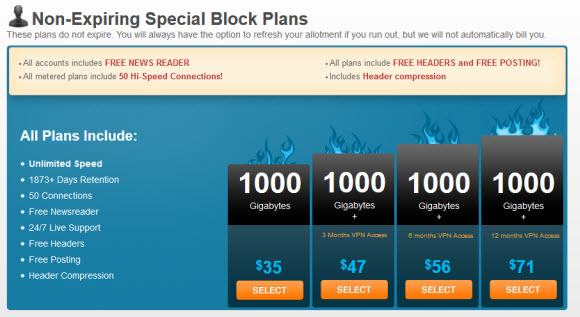
NewsDemon is offering a new promotion that includes a 1000 GB block of Usenet access for just $35.  That’s a great deal on a large block of newsgroup downloads.  Those of you who wish to protect your online privacy can combine the block with a SlickVPN account.  NewsDemon is offering quarterly, six month and annual VPN.  Enjoy the 1 TB block plus a year of VPN for just $71.  Visit the NewsDemon VPN special page to sign up.

NewsDemon VPN Special

We’ve been using NewsDemon for years and highly recommend their Usenet service.  You’ll be hard pressed to find a faster, more reliable network than the one used by NewsDemon.  Their block accounts come with access to 1,873+ days of binary retention along with a free copy of News Rover newsreader and up to 50 connections.

NewsDemon has partnered with SlickVPN to offer their members the option of adding VPN service to their Usenet plan.  Those who just wish to download from newsgroups can rely on SSL to secure your connection.  SlickVPN helps protect your privacy while carrying on other activities online.  We use VPN at home and even more when traveling.  With a VPN router you can protect your home network with a single VPN account.

Here’s a summary of the NewsDemon / SlickVPN promotion:

  • 1000 GB block – $35
  • 1000 GB block + 3 months VPN – $47
  • 1000 GB block + 6 months VPN – $56
  • 1000 GB block + 12 months VPN – $71

We’re not sure how long Newsdemon is offering the promotion so if your interest we suggest you sign up soon.

Using SSL and Personal VPN To Secure Usenet Access

Today we’d like to share some tips to help secure your privacy while accessing Usenet.  Along with browsing the web and other applications.  We get questions all the time from users who want to secure their connections.  Most of them are familiar with the term SSL from secure online transactions.  Yet they might not have experience configuring a newsreader for SSL.  We will explain the process.  Along with the advantages of personal VPN’s.

Secure Usenet access

Let’s start by answering a couple of questions in regard to SSL.

  • What is SSL and why would I want to use it?

SSL stands for Secure Socket Layer.  We all use SSL for tasks like shopping online and accessing bank, credit card or other financial services.  Why not take advantage of the same encryption to secure your Usenet connection.

  • Why do I need secure Usenet access?

We won’t call it a ‘need’ but it is certainly our preference to secure our data online.  Including user name and password.  In addition SSL can help prevent the hassle of ISP bandwidth throttling and deep packet inspection.

Tip #1 – Find a Usenet Provider with SSL and Alternate Ports

In conjunction with SSL, alternate ports will help in securing your Usenet connection while minimizing the risk of poor performance from ISP throttling.  Instead of using the port your ISP expects for secure Usenet traffic some providers offer alternate ports.  While most Usenet services offer SSL encryption you have to look closer to see if alternate ports are available. We provide a table of alternate news server ports on NGR to help.

Here are a few leading Usenet providers that offer alternate ports:

Tip #2 – Configure Your Newsreader for SSL Usenet Access

Assuming you found a good Usenet provider with SSL access its time to configure your newsreader for secure access.  We will demonstrate with a couple of examples.  First with Newshosting using their new Usenet client.  Then again with UseNetServer using Newsbin Pro.

  • Configuring SSL with Newshosting and the new Newshosting Usenet client

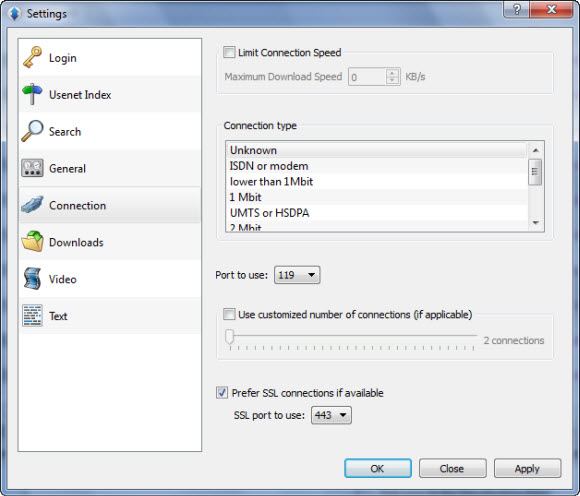
If you haven’t had a chance to try the new Newshosting client they are currently offering a 14 day free trial.  Once downloaded you simply launch the newsreader.  Entering in your username and password credentials.  Next click on OptionsSettings and choose the Connection tab.  Here is the resulting screen:

The process couldn’t be much easier.  As you don’t even need the news server address to access via the Newshosting newsreader.  You’ll notice an option at the bottom of the screen labeled ‘Prefer SSL connections if available‘.  Simply check the box.  Then choose your desired port.  The default SSL port for Usenet is 563.  For most this is fine but we highly recommend using port 443.  As port 443 is the same port secure web traffic passes over.  Not much chance your ISP will want to mess with traffic on port 443.

  • Configuring SSL with UseNetServer and Newsbin Pro newsreader

This is more of the traditional process for those who have their own Usenet client.  We use UseNetServer for this example since they rank #1 on NGR and offer $10 unlimited Usenet access.  Along with our top rated newsreader – Newsbin Pro which offers a free trial download.

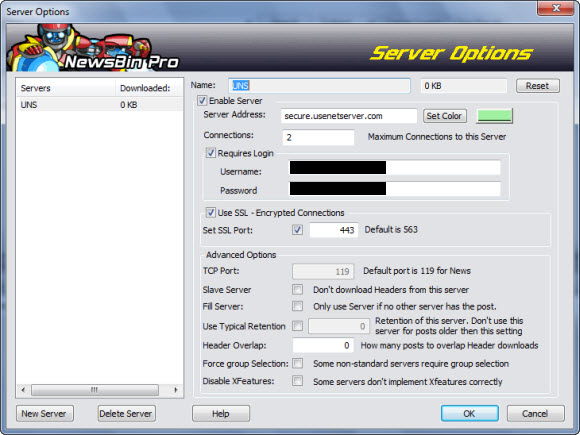
After opening Newsbin Pro click on OptionsServers.  Choose the server you entered during setup or add a new service.  Either way the news server address for SSL access to UNS is secure.usenetserver.com – enter it into the Server Address field as shown below.

Just under the Server Address box you’ll notice an option for ‘Use SSL – Encrypted Connections‘.  Check the box and then enter a port number.  Again the default SSL port for NNTP is 563.  For best performance (to deter ISP traffic tampering) we suggest you use port 443.

Tip #3 – Consider a Personal VPN Service

Our final tip goes well beyond Usenet.  As we believe that all your online activities should be private and secure.  We’re not advocating bad behavior either.  We just believe that what you do online is your business.  If you choose to tell everyone about it on Facebook that’s one thing.  However, if you want privacy then a VPN will help.

For full disclosure we’d like to point out that in addition to NGR we manage a VPN review site – vpnsp.com – where we’re working hard to build up a complete resource for those seeking VPN access.  Nearly two years into the project we feel good about it’s progress and are happy to share VPNSP with our readers.

Personal VPN’s offer a number of advantages.  Here’s are a few examples of how VPN access might help you:

  • Secure Wi-Fi access – always protect yourself on open networks!
  • Secure Internet access, email, Skype, VoIP, etc.
  • Anonymous Internet access – protect your personal information from sites that profile visitors
  • Help decrease the chance of your ISP throttling traffic
  • Don’t allow others to track you by your IP address
  • Enjoy familiar content while traveling – Netflix, Hulu. YouTube, Facebook, Pandora, etc.

Just like Usenet providers, personal VPN services are not all created equal.  There are a number of factors to consider when comparing VPN providers.  Before purchasing an account consider these features:

  • Don’t overpay.  Just like anything else the most expensive providers aren’t always the best.  You can easily find quality VPN access for under $10 a month.  With annual plans as low as $6 a month – VPN specials
  • Does the service offer unlimited VPN? – as many Usenet fans will want unlimited usage.
  • How large is the VPN provider’s network?  How many countries does it span?  How many total servers?  How many total IP addresses?
  • Total IP addresses is very important.  While most smaller services don’t advertise the number, leading services like IPVanishHide My Ass, OverPlay andgladly share this information.  Think of IP’s as the number of seats a VPN service has open.  If those seats fill you can’t connect.
  • Look for a service that supports OpenVPN, L2TP and PPTP protocols.  OpenVPN will provide the best security while L2TP/IPSec and PPTP will extend compatibility to iOS and Android devices.
  • If you want to secure your entire home network with one VPN account look for a service that supports DD-WRT routers.

Here are a few leading personal VPN services to consider:

We hope you’ve found our tips for helping secure your Usenet access with SSL and VPN useful.  For more information on secure Usenet access visit Newsgroup Reviews.  For those who would like to learn more about VPN visit our VPN Service Providers review site.  Follow us on Twitter – @NewsgroupRevs and @VPNSP for the latest Usenet and VPN news along with special promotions.

theCubeNet Adds Bitcoin Payments

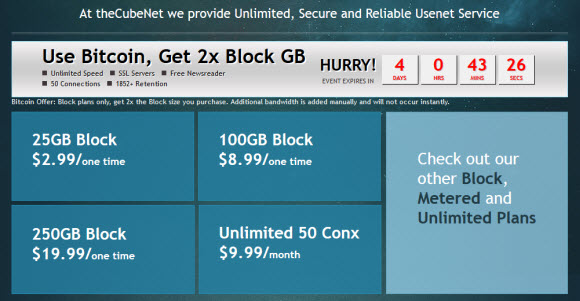
Usenet fans in search of more anonymous payment options will appreciate the latest news from theCubeNet.  There aren’t many newsgroup providers that offer Bitcoin yet but that could change as services start promoting it as a payment option.  In fact theCubeNet is encouraging Bitcoin use by offering double the block size this weekend.  You can pick up a 500 GB block with Bitcoin for just $19.99.  Visit theCubeNet.com to sign up.

theCubeNet Bitcoin Promotion

theCubeNet Bitcoin special will be live through the end of the weekend.  They are offering special prices on unlimited Usenet access as well as block accounts.  Their unlimited plan is $9.99 a month but where they really shine is their block deals.  If you just need a small block for fills you can pick up a 50 GB with Bitcoin for just $2.99.  Those who want more can look at the 100 GB and 250 GB options.  Double either using Bitcoin.

If you’re new to theCubeNet this is a great time to test it out.  We’ve used them for years.  You’ll find their network to be very good.  We enjoy excellent performance with SSL enabled.  They offer up to 50 connections but you won’t likely need anywhere close to that on their network.  You can browse over 1,850 days of binary retention and download a free copy of News Rover to get started.  Cheers to their team for adding Bitcoin payments.

Visit Newsgroup Reviews to learn more about Usenet.  Follow us @NewsgroupRevs for the latest deals.

NewsgroupDirect September Terabyte Tuesday

The NewsgroupDirect Terabyte Tuesday promotion couldn’t come at a better time for those who need a block of Usenet.  Whether as a primary account, a backup or for fills.  Regardless the NGD Terabyte Tuesday special will take care of many users needs.  Those unfamiliar with the promotion will want to check it out today because the deal runs for 2 days.  With a new promotion running every so often.  Sign up by midnight and enjoy a 1 TB block of Usenet access for just $38.  That’s 62% off NewsgroupDirect’s regular price of $100 for the block.

The Terabyte Tuesday special comes with 1 TB of non-expiring Usenet access.  So if you’re usage is light you can enjoy the block for a long time without incurring additional costs.  NewsgroupDirect offers some 1,850 days of binary retention along with 50 connections for block members.  Remember to sign before 12 am EST on September 12 to take advantage of the Terabyte Tuesday promotion.  If you think the deal is a good one then please also consider helping spread the word on Twitter by using hash tag #TBTuesday.

Visit NewsgroupReviews to learn more about newsgroups.  Follow us @NewsgroupRevs for the latest deals.