SABnzbd 0.7.0 Pre-Download Check

June 13, 2012 update – SABnzbd released version 0.7.0 final.  Visit sabnzbd.org to learn more and download the new 0.7.0 release.  Continue reading our post to learn about a key new features in SABnzbd 0.7.0.

Those who follow the development of SABnzbd closely are enjoying the latest SABnzbd 0.7.0 beta.  The new beta 3 version was released last week.  The client has a number of new features including a completion checker.  The official name is pre-download check and the purpose is similar to the NZB Completion Checker app.  Checking for completion before downloading can save you a lot of time and frustration.  The new feature is experimental.  You can learn more about SABnzbd 0.7.0 beta 3 and find the download link here.
Here’s some more info on the new pre-download check feature directly from the SABnzbd wiki:

Pre-download check (Experimental)

If you are hit by frequent incomplete and non-repairable downloads and worry about wasted time, bandwidth or quota, there’s the pre-check.
Before downloading, SABnzbd will check if enough articles are available on the server.
Note that this an experimental feature, with the following issues:

  • The pre-download check takes some time, but much less than a (failed) download.
  • SABnzbd calculates the balance between missing articles and available par2 file. However it’s not possible to make a 100% accurate prediction

If you turn on this feature (Config->Switches), it will be used for all new jobs that enter the queue. When something in the queue is being pre-checked, the mouse-over will show “Status: Checking”. Note that during this phase, the download speed shown by SABnzbd will be low (for example “7 kB/s”), and thus the ETA will be very high. You should ignore the high ETA.
When a pre-download check fails, the job will go to History with a message like “Download would not be successful, only 99.5% available “in red. You can click Retry if you want to download anyway.

As the pre-download check feature description explains, SABnzbd will attempt to determine completion and whether or not there are enough PAR2 files to fill in the gaps.  The process isn’t perfect but we cheer the addition of the new feature.  While NZBcc is a great app, having similar functionality built into your client is a big plus.

With close to 4 million downloads SABnzbd is easily the most popular free Usenet browser ever released.  You’ll find that most people either love or hate it.  Those with technical backgrounds appreciate all the features, options and add-ons available.  While some find the client confusing.  If you’re new to SABnzbd give it some time.  Check out their user manual and rely on other users in the forum when needed.  SABnzbd has a very active and growing community around it.  Then after you get comfortable take a look at all the great add-ons.

Visit Newsgroup Reviews to learn more about Usenet.  Follow us @NewsgroupRevs for the latest specials.

Forte Agent 7.0 Usenet Client Released

Forte recently announced the release of Forte Agent 7.0 Usenet client.  The last version (6.0) came out toward the end of 2009 so we we’re glad to see Forte release another major update.  It sounds like they put a lot of effort into re-engineering Agent 7.0 to handle the rapid growth and expansion of Usenet.  The major updates include article number expansion, optimized message retrieval, improved saving of attachments and improved connectivity with SMTP servers.  Take a look at the Agent 7.0 bulletin to learn more about the new release.

Those new to Forte Agent can download a 30 day free trial of the newsreader.  You can purchase a new license for $29 or upgrade from version 6.0 for $19.  Either comes with three months of free APN access.  Agent Premium News (APN) is Agent’s Usenet service.  It supports 600 days of binary retention.  Those who buy a license for Agent 7.0 also receive 15 GB of APN Usenet access a month for three consecutive months.  After that prices range from $2.95 a month up to $14.75 a month depending on your desired usage.

Those currently running older versions of Agent will want to back up your data before installing 7.0.  The new release is not compatible with older versions of Agent.  See their Agent release notes for more details.

Visit Newsgroup Reviews to learn more about Usenet.  Follow us @NewsgroupRevs for the latest deals.

SABnzbd Exceeds Four Million Downloads

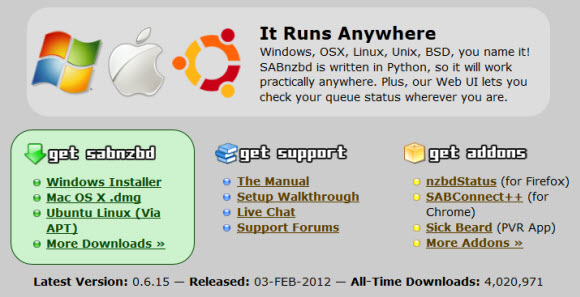
SABnzbd, one of our favorite newsreaders recently celebrated a new milestone.  Having exceeded four million downloads of the popular Usenet client.  The open-source browser continues to impress users with their regular updates along with several nice add-ons developed for the client.  Earlier today the SAB development team pushed a new beta version.  Their fourth new beta release this month.  You can keep up with the all the latest developments via their announcements page.  As always SABnzbd is free to download and use.

Whether your new to Usenet or a veteran, SABnzbd has something for everyone.  Those with a technical background will especially like the level of control you have when configuring the web-based Usenet browser.  While new users appreciate SABnzbd automatically downloading their chosen content.  In the end the reader has something for just about everyone.  Visit sabnzbd.org to download the latest 0.6.15 final release.  Those who want the latest features and don’t mind the trial and error of testing can check out their beta releases.

Visit Newsgroup Reviews to learn more about Usenet.  Follow us @NewsgroupRevs for the latest offers.

NewsLeecher Releases Version 5 Beta 13

Earlier this week NewsLeecher released their first beta of the year.  On April 7, 2012 NewsLeecher rolled out version 5.0 beta 13.  The release appears to be focused on the user interface and further improving the usability of the popular Usenet client.  NewsLeecher customers can download the latest beta directly from their site.  Those new to the software can download a free trial copy from their beta page.  A license costs $20 a year.

Here’s a list of the new features in NL version 5 beta 13 directly from their version history page:

NewsLeecher v5.0 Beta 13
Release Date: 2012-05-07 17:34:24

+: Redesigned bookmarks navigation and GUI on the Explorer Tab,
so it flows better with the rest of the application design.
+: We’ve added a new (fifth) option to the ‘Compacting’ feature.
The feature can be accessed by clicking the ‘Compacting’ button
in the lower right corner of the NewsLeecher main window.
+: Reintroduced support for “descript.ion” files. The feature
can be enabled from:
Settings -> Adv. Nerdy Tweaks -> Download Descript.ion File…
+: The SuperSearch ‘Watchdog’ state and the SupeSearch max days
/ category settings are now saved between sessions.
*: Smaller improvements. Added a ‘Open Folder in Windows Explorer
button to the NewsLeecher Explorer Toolbar and relocated the
SuperSearch ‘Search’ button to the right side of the search
input box.
!: Found and fixed one more small memory leak. NewsLeecher should
be close to 100% memory leak free now.
!: Fixed a couple of smaller bugs in the selection logic used
in the ‘Groups Navigation Panel’.

Visit Newsgroup Reviews to compare Usenet clients and follow us @NewsgroupRevs for the latest news.

Usenet Client Free Trial Downloads

Looking for a new Usenet client?  Want to try out some of the leading premium newsreaders before you decide which to use?  If so you’ve come to the right place.  As we’re going to link you to free trial downloads of some of the best Windows and Mac Usenet browsers.  For those seeking Usenet access along with a newsreader we’ll also include a special offer from Newshosting that includes a free client with Usenet search.

Looking for unlimited Usenet along with a client and search capabilities?  If so check this out:

Newshosting offers 1,350+ days of binary retention along with 1,400 days of text posts.  Members enjoy unlimited Usenet access, Newshosting Usenet client, 256-bit SSL, uncapped speed and 24/7 support.  Take advantage of the Newshosting $9.99/mo. and $99.99/yr. unlimited Usenet specials.

For those who already have newsgroup access and are looking for a premium Usenet client there are lots of options.  Here are some of our favorite newsgroup reader choices for both Windows and Mac.  For the first list we picked out the leading paid newsreaders for each operating system.  Preferring those free trial downloads that do not require credit card or any other personal information beyond perhaps an email address.

Premium Windows Usenet clients with free trial downloads:

Premium Mac Usenet clients with free trial downloads:

Here are some quality free Usenet clients as well:

Our favorites include the Newshosting client and Newsbin Pro for Windows.  Along with the Newshosting client, SABnzbd and Binreader for Mac.  As for the free clients we’re quite fond of SABnzbd.  The popular, open-source newsreader runs in your web browser and has several nice add-ons available.

What should you look for when testing the clients?  That really depends on your preferences.  We like newsreaders with built-in Usenet search engines.  The ability to preview downloads is a nice plus.  When it comes to downloads we want to mark the content and have the client do the rest including PAR repairs and unRAR functions.  Those are the features that top our list.  Enjoy testing all the latest Usenet clients.

Visit Newsgroup Reviews to learn more about Usenet.  Follow us @NewsgroupRevs for the latest specials.
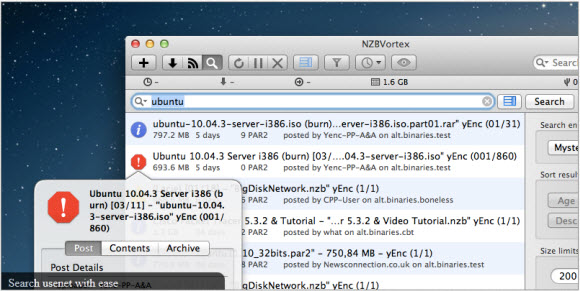
NZBVortex 2.7.1 Mac Usenet Client Release

NZBVortex recently released a new version of their popular Mac Usenet Client.  NZBVortex version 2.7.1 includes a number of new features along with bug fixes.  You have the option of downloading a free version of NZBVortex with some limitations or you can purchase a license for $19.99 from the Mac App Store to open up all the bells and whistles.  Including advanced post processing and support for multiple news servers.

Here’s a full list of NZBVortex 2.7.1 features taken directly from the NZBVortex site:

  • Fixed in 2.7.1: A potential crash while downloading a zip in watch folder
  • Rare crash during adding of a NZB after a damaged NZB (gerteunis) – resolved.
  • Implemented a NFO preview popup for search results (gerteunis) – resolved.
  • Dont offer to move app to applications in sandbox mode (gerteunis) – resolved.
  • Make MAS sandbox compatible on Mac App Store
  • Use a semi private API to detect if an file is in use (gerteunis) – resolved.
  • “?” Matching in filtering etc should match exactly one character (gerteunis) – resolved.
  • Cleanup rss view and make it easier to understand (gerteunis) – resolved.
  • Delete files from parse queue when they don’t contain an nzb start tag (gerteunis) – resolved.
  • “Auto remove finished nzbs” prevents queue completed notify & sleep (gerteunis) – resolved.
  • Show NFO links back in search results (gerteunis) – resolved.
  • Show files + PAR2 file count in main search results (gerteunis) – resolved.
  • Rebuild state file when SQLite open fails (gerteunis) – resolved.
  • Remove temporary entitlement and use secure bookmarks (gerteunis) – resolved.
  • Failed download counts as paused and finished at the same time (queue status) (gerteunis) – resolved.
  • Blacklist path finder for open file check (gerteunis) – resolved.
  • Pause nzbs containing uuencoded articles (gerteunis) – resolved.
  • Add “maxsize=” to the SD RSS feed created with “Save As RSS” button (gerteunis) – resolved.
  • Option to disable growl notifications (gerteunis) – resolved.
  • Very sporadic crash while deleting a finished download (thanks Winston Smith) (gerteunis) – resolved.
  • Double add of same nzb still posible sometimes (gerteunis) – closed.
  • Only SHA1 check NZB files in parse queue (gerteunis) – closed.

If you enjoy downloading from Usenet via Mac then definitely check out NZBVortex. Visit their site and download a trial copy or buy a license.  NZBVortex continues to evolve into one of the very best Mac clients on the market.

Visit Newsgroup Reviews to learn more about Usenet.  Follow us @NewsgroupRevs for the latest specials.
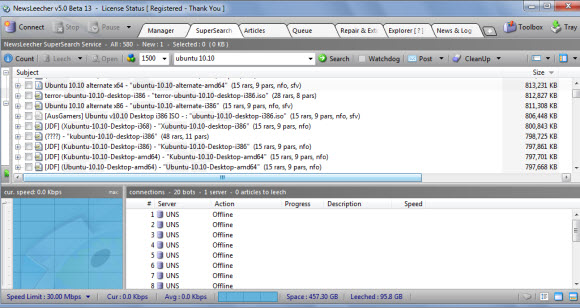
Can NewsLeecher Turn Things Around?

We report on sites and service issues all the time.  Providing suggestions for temporary alternatives during outages and more permanent solutions when sites close down.  Yet most aren’t as drawn out and frustrating as the current situation over at NewsLeecher.  Perhaps it’s our personal connection with the newsreader.  As a number of NGR editors have enjoyed the NewsLeecher client and SuperSearch through the years.  Yet the lack of support along with software bugs and unreliable service have left many looking for other options.

We’re not here to bash NewsLeecher.  There’s enough of that going on in the NewsLeecher forums.  The problem is there’s no one there to give timely answers.  Leaving customers shaking their heads when they have questions rather than getting the necessary answers.  Along with NewsLeecher / SuperSearch issues which include website outages, problems with SuperSearch and most recently a server crash.

The question is can NewsLeecher still turn things around?  For some the answer is no.  In fact the problem is bad enough for a NewsLeecher forum moderator to call it a day.  Here’s the post by Magic:

Lack of support. that whats happened.

I am a forum moderator (came back after a while of absence) but I can’t do this alone, Spiril and Smudge are not to be seen anywhere…

They do come at this forum once a month (if we’re lucky).

I do not get any response from them in the “moderator only” forum, so I called it a day. It’s a shame though cause NL is indeed one of the finest out there.

But with the lack of support, list of bugs and SS not working I’m not surprised that people are leaving.

I think that sums up the situation pretty well.  Can NewsLeecher turn things around?  We think they still can.  Especially for those who haven’t already given up on them.  Even those who have might give NL a shot again over time.  The key will be finding a way to provide users with timely feedback along with bug fixes, a reasonable development schedule and most of all reliable client and SuperSearch functions.

There is another option.  NewsLeecher is a good Usenet client.  It has some issues but is still one of the best newsreaders around.  If the time isn’t there to support the client then perhaps someone else could take over or partner on the project.  Giving the current developer more time for other priorities.

Time will tell whether or not NewsLeecher can turn things around.  We hope so given the history of the client.

Visit Newsgroup Reviews to compare Usenet clients and follow us @NewsgroupRevs for the latest deals.

Newsbin 6.31 Enhanced PAR Functionality

April 15, 2012 update: Newsbin 6.31 is no longer in beta.  Visit the Newsbin download page to grab the new version.  If you already have a Newsbin license then all upgrades are free.  Those new to the client can download a 10 day free trial or purchase a license for just $20 with lifetime upgrades.

The latest Newsbin Pro beta – Newsbin 6.31 Release Candidate 4 – enhances the reliability of their autoPAR feature.  While also giving users the option to have Newsbin automatically download PAR files instead of pausing them be default.  We’ll share some more details on each of the latest enhancements along with our recommendation for why you might want to stick with letting Newsbin pause your PAR downloads be default.  Visit the Newsbin beta page to check out the new features.  Licensed users enjoy free lifetime upgrades inclding beta releases.  Those new to the client can test it free for 10 days and then buy a license for just $20.

Newsbin 6.31 includes a bug fix that will allow it to process RAR sets more reliably.  In addition to a couple new PAR options.  Specifically ‘Daisable Automatic PAR Unpausing’ and ‘Aggressive Assembly Mode’.  Those who install Newsbin from scratch will download all PAR files and have ‘Aggressive Assembly’ mode on by default.

The new ‘Aggressive Assembly‘ mode is helpful.  When enabled Newsbin will examine your RAR set after the download finishes (10 seconds after the last chunk completes) and determine if you have enough PAR files for any necessary repairs.  Assuming there are enough PAR chunks Newsbin takes care of the repairs.

The new ‘Disable Automatic PAR Unpausing‘ is for those who prefer downloading all the PAR files up front.  We would personally rather wait and download only the necessary PAR’s but understand that some would rather download everything up front.  Please understand that even if you let Newsbin pause the PAR downloads it will still grab any necessary PAR’s for repairs.  So we suggest letting Newsbin pause your PAR downloads.

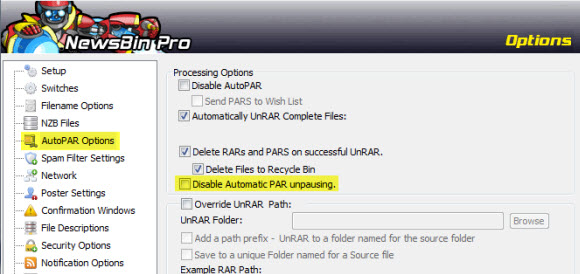
To toggle the ‘Disable Automatic PAR Unpausing‘ modes open Newsbin and click on Options and then Options.  Once the Newsbin Options screen is up click on the AutoPAR Options icon to the left.

As you can see above you have the choice of whether or not to ‘Disable Automatic PAR Unpausing‘ and can toggle the setting.  Since we upgraded to Newsbin 6.31 this is the default setup.  Which is preferable to us since Newsbin does a fine job of downloading PAR files only when necessary.

If you download a fresh copy of Newsbin and want to let the client only download PAR’s when necessary just go to the screen above and uncheck the ‘Disable Automatic PAR Unpausing‘ box.  This is especially helpful for those on slower connections and block account users.  Since downloading all the PAR files is normally overkill.

We’ve enjoyed covering Newsbin for years now.  The client is an excellent fit for new and experienced users.  Moderate to advanced users will also enjoy the extra features and tweaks to help enhance your Usenet experience.  Download a free trial of the 32-bit or 64-bit version of Newsbin 6.31 beta.

Visit Newsgroup Reviews to learn more about newsreaders and follow @NewsgroupRevs for the latest offers.

NewsLeecher Site and Client Validation Down

April 14, 2012 update – the Newsleecher homepage now shows a generic ‘Under Construction’ message.

April 13, 2012 update – earlier this month Newsleecher had issues with SuperSearch.  Today the site is down.

February 21, 2012 update – the Newsleecher site is currently down.  Right now the newsleecher.com site is timing out.  This time around it appears the SuperSearch service is also unreachable.

Originally posted January 7, 2012 after the first Newsleecher outage.  Updates above for recurring downtime.

A few days ago we heard from a NewsLeecher user that the site was down for a short period of time.  We didn’t report it though since it appeared to be a short-term problem and all sites have technical issues now and then.  Today is worse though as users are reporting that not only the Newsleecher.com site is down but the newsreader is failing to work properly for some as the software key validation server isn’t responding.

Visiting the Newsleecher.com website returns a ‘Bad Request (Invalid Hostname)’ message.  We have been able to use NewsLeecher 5 beta 12 and SuperSearch features but understand some are having problems.  With the software reporting an error in response from the key validation server.  We’re not sure why some are having issues while others aren’t.  Perhaps NewsLeecher phones home at certain intervals.

Regardless of the reason behind the issue the outage points to a deeper challenge for software developers who choose to validate software keys on launch or at regular internals.  As in this case technical issues leave some users without access to the newsreader and SuperSearch service.

NewsLeecher has been one of our favorite Usenet clients over the years.  We admire the new features and pace of development over these last few months.  So we’re not changing our opinion of the software over this incident but also understand why some customers are frustrated by the outage.

NewsLeecher alternatives

Those having issues with their NewsLeecher client might consider these alternatives:

  • Newshosting offers unlimited Usenet with a client and Usenet search for $9.99 a month or $99 a year.
  • Newsbin Pro is another of our favorite newsreaders.  They offer an optional Usenet search service.
  • SABnzbd is an open source, web-based newsreader that runs as a web server with some cool add-ons.
  • Binreader is another great choice.  We enjoy running the Windows portable version from thumbdrive.

As we finish this post it looks like the NewsLeecher.com site has been down for over four hours.  We hope the site and validation server access is restored soon.  For future issues it would also be nice if NewsLeecher had a way to notify customers of outages.  Either via a Twitter account or another domain would work nicely.  As NZBMatrix does a good job of posting any planned maintenance or outages on nzbmatrix.info.

Visit Newsgroup Reviews to compare Usenet clients and follow us @NewsgroupRevs for the latest deals.

Merlins Portal Alternatives for Searching Usenet

Earlier this month Merlins Portal closed indefinitely.  You can visit merlins-portal.net to read the latest owners closing remarks.  In case the site goes completely dark here’s a link to the Merlins Portal closing letter.  In the last week we’ve received some emails asking us to recommend alternatives to Merlins Portal.  There are several options to choose from.  Visit our Usenet search section for a full list or read below for our top picks.

Top 5 Merlins Portal Alternatives

Here is our list of favorite Usenet search options:

1. Newshosting Usenet Client

Newshosting members can rely on the built-in Usenet search engine inside their popular Usenet client to find content.  The newsreader is available for Windows, Mac and Linux.  Search for content, preview videos before downloading, automatically repair files and unRAR.  The client is free to all Newshosting subscribers.  Enjoy unlimited Usenet access for $9.99 a month or $99 a  year.

2. Newsbin Pro Search

Newsbin Pro newsreader has an optional Internet search feature.  The Usenet search engine finds the best results from over 1,000 days of binary newsgroup content.  With an excellent user interface and filtering options.  The prices ranges from $2.50 to $5 a month.  Visit the Newsbin search page to learn more.  You can also download a free trial to test the client and search features.

3. Binsearch

Binsearch is our favorite website for conducting Usenet searches.  Their engine is built into the Newshosting client.  Those who aren’t Newshsoting members can also visit binsearch.info to search 1,100 days of binary posts across 400+ newsgroups.  You can also browse newsgroups, search contents of nfo files and filter results using Binsearch.

4. NZB.cc

NZB.cc is operated by the same folks as Binsearch.  The difference is that the site is setup to provide the most relevant results across 800 days of binary retention.  Visit nzb.cc and try it out for yourself.  The engine looks at factors like file set size, PAR files and .NFO file inclusion to help determine relevance.  With the best search matches listed first.

5. NZBMatrix

NZBMatrix is one of our favorites.  They had some technical issues in months past but seem to be back at 100% now.  Visit nzbmatrix.com to sign up for an account.  While you can use the site for free the real value comes in having a premium membership.  Search from 1,500 days of binaries.  Though at the time of writing this post Usenet providers only support around 1,350 days.

Visit Newsgroup Reviews to learn more about Usenet.  Follow us @NewsgroupRevs for the latest deals.