NewsgroupDirect Leap Day Sale

NewsgroupDirect is celebrating Leap Day with a promotion on 250 GB block accounts.  Today only you can purchase a 250 GB non-expiring Usenet block for just $20.  That’s a $12 (38%) savings off the normal $32 price.  Those who purchase the 250 GB block today will also receive a $10 credit toward any purchase made in March, 2012.  Visit the NewsgroupDirect Leap Day page before midnight EST to take advantage of the offer.

The NGD Leap Year special is an excellent deal on a 1/4 terabyte of Usenet downloads.  At just 8 cents a gig for the 250 GB block.  Really just 4 cents a gig if you factor in the $10 credit toward any March purchase.  We encourage you to check out this deal in the few hours it has remaining.  We’ve been fans of NewsgroupDirect for a long time now and highly recommend the service to anyone interest in accessing newsgroups.  Remember to visit the NGD Leap Day special page before midnight EST to take advantage of the offer.

Visit Newsgroup Reviews to learn more about Usenet.  Follow us @NewsgroupRevs for the latest promotions.

theUsenet Leap Year Special

Last November we introduced you to a new Usenet provider – theUsenet.  Since then we’ve had a chance to test the service and were pleased with their reliability and timely response from support.  Fast forward a few months and theUsenet is now offering a Leap Year special.  Including deeply discounted prices on a couple select monthly and block accounts.  With prices from $2.29 a month for 29 GB of Usenet access with free SSL.

Here’s a summary of theUsenet features:

  • 1,179 days of binary retention
  • 1,265 days of text retention
  • 99%+ completion rate
  • Over 107,000 newsgroups
  • Up to 50 connections
  • 256-bit SSL encryption
  • 24/7 live hat support

Here’s a summary of theUsenet leap year specials:

  • 29 GB a month with free SSL – $2.29 a month
  • 290 GB block with free SSL – $17.29
  • 1 TB block with free SSL – $48

Both the 29 GB monthly special and block account are excellent values.  Note that the 29 GB plan is billed monthly while the block accounts are billed once.  With block Usenet accounts from most providers (including theUsenet) you can keep downloading until you use up the gigs purchased.  In this case 290 GB or 1 TB.

Visit Newsgroup Reviews to learn more about Usenet.  Follow us @NewsgroupRevs for the latest specials.

Newsbin Pro 6.3 Adds Video Sampling

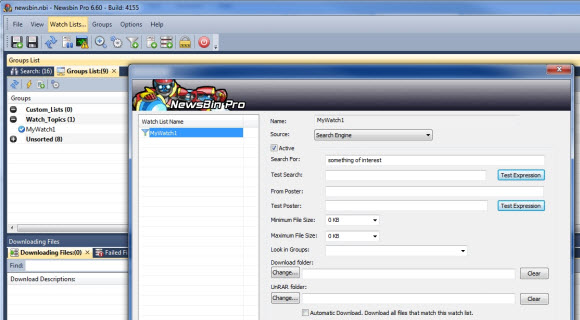
Late last year we reviewed a new app for Newsbin that let’s users control the newsreader remotely from iPhone, iPad or iPod Touch.  The NBRemote app enhances the experience for iOS users.  Since then Newsbin has been busy working on new features for their popular Usenet client.  Rolling out new versions including Newsbin Pro 6.3 Release Candidate 2 on February 24th.  One of the new features in Newsbin 6.3 caught our eye.  The ability to sample video files while downloading.  You can download a 10 day free trial of the client.

For those who haven’t used Newsbin in awhile the look has changed quite a bit.  We really like the clean layout and flexibility of the client.  As mentioned above Newsbin 6.3 (starting at beta 5) added support for video previews along with a number of other new features, enhancements and bug fixes.

Here’s a change summary for Newsbin 6.3 RC 2 from their beta page:

  • New Sample mode allows you to view the beginning of a video before the entire rar set completes downloading. Available from the Download tab or the Files tab, both in the toolbar and in the right-click menu.
  • Growl support for notifying on certain events.
  • Made retries configurable. Should help for iffy connections. Default is 2. Can modify under Options/Setup.
  • New column in Groups tab called “New Records” lists number of new posts since the last load.
  • Better progress reporting in Download tab
  • Fixes to resolve memory problems on 32 bit systems
  • Ctrl-Y to force a download now bypasses spam filters too (Add to Download List – Bypass Filters)
  • New authentication scheme for Remote Control Interface so you don’t have to enter your Newsbin key anymore (which is a pain on an iPhone).
  • Expanded Unicode (UTF-8) support for folder names and throughout program.
  • Added ability to have Newsbin either shutdown your PC, make it go to sleep, or hibernate when the download list empties.

We highly encourage you to check out the latest edition of Newsbin Pro.  Those who have a license can always download the latest version for free directly from Newsbin.com.  Those new to the Usenet client can give it a test spin by downloading the free 10 day trial.  Then a license is just $20 and includes free upgrades for life.

Visit Newsgroup Reviews to learn more about Usenet clients and follow @NewsgroupRevs for the latest deals.

Usenet Quick Start Guide

The primary goal of NGR is to provide comprehensive Usenet coverage.  Including all of the active Usenet providers, newsreader clients and search sites.  Yet we understand that some of you don’t want to take the time to read several reviews and consider all the options.  You’d rather be up and running on Usenet asap.  If you fall into that category then this Usenet quick start guide is written for you.  We’ll focus on Newshosting since they offer an excellent Usenet client and unlimited Usenet to our readers for just $9.99 a month or $99 a year.

First we’d like to give you some background on the Newshosting service and their popular newsreader client.  Newshosting is a leading Usenet provider and offers everything you would expect and then some.  From high retention and completion to 256-bit SSL, news servers in the U.S and Europe, free newsreader with built-in Usenet search, uncapped speeds and unlimited Usenet access.  Their Usenet client supports Windows, Mac and Linux.  The software takes care of everything.  Search for content, preview, download, repair and extract.

Step 1 – Sign Up for Newshosting’s Unlimited Usenet Plan

Joining Newshosting is simple.  New members save up to 44% off their unlimited plan.  With unlimited Usenet downloads for just $9.99/mo. or $99 a year.  The discount in recurring so enjoy the savings for the life of your account.  To learn more and to sign up visit their Newshosting NGR special page.  The registration process is simple.  Just enter your name, email address, desired username, password and payment information.  Newshosting offers PayPal and credit card payment options.  Shortly after signing up you’ll receive an email with everything you need including a link to the Newshosting client download.

Step 2 – Download and Install the Newshosting Usenet Client

By now you’ve received your welcome email from Newshosting.  In it you’ll find everything you need to get started.  Including a link to download their Usenet client.  For future reference you can also log into the Newshosting.com site anytime and access the client download page from within the control panel.

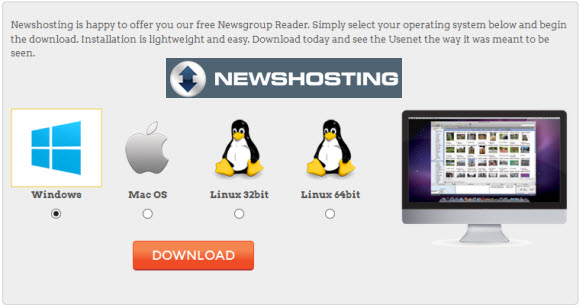
Once you’re on the Newshosting client page simply click on the radio button for the version you’d like to download – Windows, Mac or Linux.  If you have more than one machine Newshosting will let you use the client free on multiple computers and operating systems.  As long as you only connect from one system at any given time.  So those with Windows and Mac systems for example can try out the client on both.

There isn’t really anything to go over in terms of the install.  You’ll download the software based on operating system and then run the file to install the Newshosting client.  The only thing you’ll need handy is your username and password.  Which you can have the client save for future launches if you’d like.

Step 3 – Configuring the Newshosting Usenet Client

If you’re in a big hurry to download something have at it.  The Newshosting client is pre-configured and ready to go.  In addition to the default settings here are a few additional tweaks that we enjoy and find helpful.  To access the Newshosting client settings open the software and click on Options and then Settings.  From there you’ll see several options with associated images to the left of the screen.

Tip #1 : Enable SSL – if you would like to enable 256-bit SSL for all your Newshosting connections just click on the Connection icon and check the “Prefer SSL connections if available” box.  For the SSL port we recommend port 443 since in some cases it will help protect against ISP throttling.  If you want to protect your online privacy beyond just Usenet connections then we suggest you consider a VPN service.

Tip #2 : Search Providers – Newshosting includes a built-in Usenet search engine.  You can search across their entire span of retention and newsgroups for content.  Along with the native Newshosting search they also include Binsearch.info as a search option.  Choosing between the two is very simple.  When doing a search you’ll see a magnifying glass icon to the left.  Click on it and you can choose between Newshosting and Binsearch.info.  Both work well and you can switch between them anytime.

Tip #3 : Download Folder – you can easily change the folder structure where Newshosting will save downloads.  To do so click on the Downloads icon.  Here you can set the main download folder along with preferences for subfolders.  Helping you sort content by newsgroup and/or date.

Tip #4 : PAR2 Repairs and UnRAR – the Newshosting client can take care of repairing partial or damaged files.  Along with extracting the resulting contents.  You can control how Newshosting handles both the PAR2 repairs and UnRAR actions from the Downloads tab in the settings area.

Tip #5 : SafeSearch Feature – Newshosting doesn’t filter search results by default.  Meaning you might run across some adult content when searching newsgroups.  If you would like to reduce the amount of adult content in search results then enable the SafeSearch feature.  Those who want their Usenet experience to remain uncensored can simply skip this step.

How’s that for a quick start for Usenet.  Within a few minutes you’ll be downloading from newsgroups like a pro.  If a friend mentioned needing additional software, newsreader, WinRar, QuickPar, etc. you can skip all of that.  Along with finding a good NZB search site.  The Newshosting client takes care of everything.  You can go back to step 1 to get started or visit our Newshosting NGR special page and then come back for the quick setup tips.

Visit Newsgroup Reviews to learn more about Usenet and follow us @NewsgroupRevs for the latest guides.

NzbLoad Web-Based NZB Usenet Client

Last year a new breed of web Usenet downloaders hit the market with services like  NZBLord and NzbLeecher.  Today we’d like to introduce you to another service called NZBLoad.  The premise is simple.  You feed NZBLoad an NZB file and it downloads the associated content from Usenet.  It lacks the features of Easynews web interface.  Yet NZBLoad is a viable option for those who just need a web-based Usenet client for downloads.

NZBLoad offers a free account of sorts.  There are a number of restrictions though including:

  • Limit of 100 MB downloaded per hour
  • Speed capped at 1 Mbps
  • 60 second wait before downloading
  • Enter a captcha string to download

You probably wouldn’t want to deal with that for every download but it would give you a chance to test the service.

Premium NZBLoad accounts include unlimited downloads at speeds up to 20 Mbps.  Pricing is as follows:

  • 2 days – €4.95
  • 30 days – €9.95
  • 90 days – €24.95

In addition NZBLoad is offering 20% off.  To take advantage of the offer use coupon code: LAUNCHDAY.  We’ll circle back with a review of the service but first wanted to share some details along with the promo code.

Visit Newsgroup Reviews to learn more about Usenet and follow us @NewsgroupRevs for the latest deals.

Easynews Crosses 1,275 Days of Binary Retention

On Wednesday Easynews updated their NNTP binary retention from 1,200 days up to 1,275 days.  That’s an addition of two and a half months of binaries.  As always Easynews customers will enjoy the higher retention without an increase in cost.  Easynews offers unlimited NNTP Usenet access for just $9.95 a month along with a free trial of their popular web interface.  Which makes is easy to access 200+ days of web retention as well.

Since there always seems to be some confusion let us explain the difference between Easynews 1,275 days of NNTP binary retention and their 200+ days of web retention.  In simple terms NNTP retention is the number everyone else uses.  UseNetServer, Newshosting, NewsDemon, Astraweb, Thundernews, NGD, Giganews, Ngroups, etc.  You get the idea.  While web retention is unique to their popular Easynews web interface.

  • NNTP retention uses a traditional Usenet clients like Newsbin Pro, NewsLeecher, SABnzbd, Binreader, etc. to connect and download from Usenet.  Easynews includes NNTP access with all plans along with the option of unlimited NNTP Usenet for just $9.95 a month.  A great value!
  • Web retention is unique to the Easynews service.  As their web interface is unique and allows anyone to easily access newsgroups.  It is the simplest means we’ve come across for non technical Internet users to make the leap to Usenet.  As the web interface allows you to search for content, preview and download.  You can even try the Easynews web interface free for 14 days.

Cheers to the Easynews team for continuing to add value with even more NNTP retention.  All for the same great price of $9.95 for unlimited NNTP access.  We look forward to their continued growth as the year goes on.

Visit Newsgroup Reviews to learn more about Usenet and follow us @NewsgroupRevs for the latest offers.

Astraweb Expands Usenet Offerings

Astraweb recently bumped up the speed on their unlimited accounts to 10 Mbit/s versus the previous 5 Mbit/s cap.  In addition they are now offering quarterly accounts for both the Astraweb unlimited and unlimited DSL (uncapped speed) plans.  For block Usenet fans Astraweb also added a 1 TB block account.  All of this is in addition to their current Usenet specials – unlimited DSL for $11 a month or $96 a year.

As you can see in the screenshot above we’ve highlighted the new accounts and updated 10 Mbps rate limit on the unlimited plan.  The quarterly unlimited plan is a good value at $20 for those with slower connections.  While the Astraweb specials are priced lower than the unlimited DSL quarterly plan.  As for block accounts the 1 TB block for $50 is a great value.  Matching NewsgroupDirect’s Terabyte Tuesday deals but available all the time.

Here’s a breakdown of the new Astraweb Usenet account pricing:

  • Unlimited : $20 for 3 months – works out to $6.67 a month
  • Unlimited DSL : $39 for 3 months – works out to $13 a month
  • 1000 GB block for $50 – works out to $0.20 a GB

All the changes were positive and add value to the Astraweb service.  We look forward to their continued efforts.

Visit Newsgroup Reviews to learn more about Usenet.  Follow us @NewsgroupRevs for the latest promotions.

NewsDemon Adds WorldPay Payment Option

NewsDemon recently added support for a new payment option.  Adding WorldPay as a source for payments.  This will allow customers in Australia and South Africa to pay with their native currency without incurring any conversion fees.  WorldPay joins PayPal, Visa, MasterCard, American Express and Discover on the list of payment options for NewsDemon.  To learn more about WorldPay visit NewsDemon’s related blog post.

In addition to accepting worldPay payments NewsDemon is currently offering a special promotion.  New members can enjoy their first month of unlimited Usenet access for just $7.  Then continue to save 50% thereafter and pay just $10 a month.  NewsDemon includes unlimited Usenet downloads along with a free copy of News Rover, 256-bit SSL and 30 GB of free online storage.  Quite a value!  Visit NewsDemon.com to sign up.

Visit Newsgroup Reviews to learn more about Usenet.  Follow us @NewsgroupRevs for the latest deals.

NewsgroupDirect February Terabyte Block Special

In the past we’ve shared NewsgroupDirect’s Terabyte Tuesday promotions.  This time around the terabyte special is running on a Friday.  Otherwise the same great value applies.  With 1 TB block Usenet accounts on sale for just $50.  A savings of 50% off the normal $100 price.  NGD block accounts are non-expiring so you can enjoy the 1 TB block until it’s all used up.  That’s a lot of downloads!  There is no need for a coupon code.  Simply visit NGD to sign up.  Make sure to do it before midnight as this offer will end after February 10th.

We recommend block accounts as a backup or fills.  Ofcourse a 1 TB block could last most Usenet fans a long time regardless of whether or not they use it to supplement an unlimited Usenet plan.  Either way you won’t find a better offer going right now on block Usenet access.  The Terabyte Tuesday deal (err Friday this time around) works out to just 5 cents a gig.  So sign up today and enjoy the extra terabyte of newsgroup downloads.

Here’s the scoop directly from the NGD blog post:

That’s Right.  Your mind = blown. Terabyte Tuesday is on a Friday this time.

Terabyte Tuesday means 1 Terabyte usenet usenet accounts for $50 (50% off the normal rate)! This is still, hands-down, the best way to save on your usenet access costs. The sale runs from 12 AM EST on February 10 until 12 AM EST on February 11. Our 1 Terabyte usenet block has access to our world-class retention (currently over 1,270 days), completion, and speed. NewsgroupDirect blocks never expire, so you can buy as many blocks as you want and never worry about losing them.

Visit Newsgroup Reviews to learn more about Usenet.  Follow us @NewsgroupRevs for the latest promotions.

NewsgroupDirect $8 Unlimited Usenet Deal

Did you miss NGD’s Black Friday deals?  If so this is your chance to take advantage of a great offer from NewsgroupDirect.  Just like Black Friday this deal is limited to 100 sign ups.  At $8 a month (60% off the regular price) for unlimited Usenet this offer will be gone quick.  To take advantage of the offer visit NGD and sign up for their $20 unlimited plan.  During check out enter coupon code ngd355422.  Remember once 100 users sign up the code will no longer be valid.  At that point you can still save 20% using our ngd201109140852 code.

As you can see above NGD normally sells their Unlimited plan for $20 a month.  The service includes high retention along with 256-bit SSL encryption, up to 50 connections and a free copy of News Rover newsreader client.  Members can connect to servers in the U. S. or Europe to maximize performance.  In addition Unlimited customers also receive 30 GB of free online storage from StorageNinja.  At just $8 a month it’s an excellent value!  If you’re not one of the first 100 sign ups also keep an eye out for their Terabyte Tuesday promotions.

Once again take advantage of the offer visit NGD and sign up for their $20 unlimited plan.  During check out enter coupon code ngd355422.  Remember once 100 users sign up the code will no longer be valid.

Visit Newsgroup Reviews to learn more about Usenet.  Follow us @NewsgroupRevs for the latest specials.