Archives for 2010

NewsLeecher Version 4.0 Final Released for Download

Newsleecher just announced that version 4 is final.  Those who didn’t try the beta version are in for some nice surprises.  Both in client features and functionality.  Along with SuperSearch updates.  NewsLeecher V4.0 final is available for download at http://www.newsleecher.com.  Current customers can download version 4 free.  Those new to the Usenet client can try it free for 14 days.


We’re happy to see NL v 4.0 go final and more excited to hear that NewsLeecher version 5 is already in development.  With a renewed commitment to future releases we’re excited to see what innovative features will be in the upcoming V5.0 betas.

For those new to NewsLeecher definitely check out the free 14 day trial and don’t forget about the SuperSearch feature.  While there are some very good Usenet search sites we appreciate the convenience of NL’s SuperSearch.

Stay tuned for more information on the NewsLeecher V5.0 beta releases.  In the meantime if you want to learn more about NewsLeecher V4.0 and SuperSearch here’s a link to the release notes covering the final and all 24 beta releases.

NewsLeecher V4.0 Final Release Coming Next Week

We’ve been fans of NewsLeecher for a long time.  The newsreader and SuperSearch feature are a pleasure to use.  In recent months though development slowed and people started questioning whether or not they were continuing to innovate the client.  The answer came this month with a message from NL’s developer along with a number of enhancements and the release of NewsLeecher V4.0 final promised for next week.

NewsLeecher V4.0 beta 21, 22 and 23 have all been released this month.  Along with an announcement that SuperSearch has been upgraded to support 1,000 days of search retention.  With the V4.0 final release promised for this coming week.

Back to the question of why the NewsLeecher V4.0 final was delayed and whether or not the Usenet client is being actively developed.  Here’s the answer direct from the architect of NL:

“As you have probably noticed, it has been quite a while since the previous NewsLeecher release. The reason is, that I ( the only developer in the NewsLeecher project ) have been deeply involved in some other projects lately, which have absorbed all my time. While I’m still very much involved in those projects, I will get (take) more time for NewsLeecher looking forward. So expect more frequent releases from now on. NewsLeecher is alive and will be so for a long time to come”

We’re happy to see NewsLeecher being actively developed and look forward to next week’s release.  While there are some fine alternatives out there we still use and enjoy NewsLeecher on a regular basis and look forward to future releases in the years to come.  If you haven’t tried NewsLeecher yet they offer a 14 day free trial.  We recommend you download V4.0 beta 23.  If you need help getting started we offer a set of NewsLeecher setup guides specific to each Usenet provider.

DMCA Takedown Requests Effect Usenet Completion

Many in the Usenet community are wondering why completion rates seem to be dropping and content disappearing from news servers.  At first some thought the issue surrounded a particular group of Usenet providers.  Now it seems like several top providers are in the same boat.  Are they having technical issues?  Or are they simply complying with DMCA takedown notices?  We don’t know for sure but we suspect they are complying with the safe harbor provision of the DMCA which requires the removal of infringing content on request of the rights holder.  The same provision that protected YouTube in their copyright infringement case earlier this year.

Please take into account that we’re all geeks.  Meaing we’re giving you our unqualified opinion.  For those unfamiliar with the DMCA it stands for “Digital Millennium Copyright Act“.  The DMCA includes the “Online Copyright Infringement Liability Limitation Act” which provides safe harbor for online services like Usenet providers, YouTube, ISP’s, etc. as long as they follow the guidelines which include promptly removing infringing material based on the copyright holders request.

Since most Usenet providers are based in the U. S. the DMCA and safe harbor protection could be very important to the future of Usenet.  Not complying with takedown notices could mean the end of Usenet as we know it.  Now that you understand why newsgroup services are compelled to comply we would like to show you how and why the DMCA removals can effect Usenet completion.  When at times it just appears like the content went missing.

Let’s take a look at a couple scenarios:

Content is unavailable via NZB file

Perhaps you go out and find an NZB file for the content you wish to download from Usenet.  Then when you go to actually download the files they are missing.

The headers are in my newsreader but the articles are missing

Perhaps you download headers on a frequent basis.  One day you decide to mark some content to download.  Although you see the headers in your newsreader the articles no longer exist on the news server.

DMCA takedown request

In both scenarios it’s possible the content you are trying to download was part of a DMCA takedown request.  Meaning the content was infringing and the rights holder requested that it be removed from Usenet.  So while it was once on the news server it had to be removed and no longer exists to download.

Again we’re not saying that all Usenet completion issues are due to DMCA requests but it appears more frequent so we thought the topic was worth mentioning.  If you are having technical issues with content you don’t feel should fall under the DMCA then we suggest you contact your Usenet provider for technical support.  If the problem persists you can always visit Newsgroup Reviews to explore your options.

SABnzbd 0.5.5 and 0.5.6 Binary Newsreader Releases

Not only has SABnzbd binary newsreader been downloaded nearly 2 million times.  The open-source Usenet client is still in development with new features and add-ons coming out on a regular basis.  Back in August we talked about the 0.5.4 release.  Now SABnzbd has released two more versions in November – 0.5.5 and 0.5.6.

Here are the release notes for SABnzbd 0.5.5:

Changes
– Use nzbmatrix.com’s new V1.1 api.
– Add Norwegian translation
– When par2 complains about bad options, report to user.
– Add INI-only option “api_warnings” to enable/disable warnings about unauthenticated access to the API.

Bugfixes:
– Improve handling of colon chars in filenames for Windows and OSX, to compensate for odd behaviour of par2.
– NZBs would be left behind, despite “.nzb” being in the cleanup-list
– When only individually paused jobs are in the queue, unpausing them would not always resume downloading
– NZB-chaining should ignore the duplicate NZB check and fix cleanup of “complete” folder after NZB-chaining.
(Chaining is the automatic re-queueing of downloads containing only NZBs)
– Plush did not save end-of-queue action.
– Zipped NZB files from URLs were not accepted.
– OSX: The end-of-queue action “Hibernate” shut down the system.
– Sanitize nzbname parameter coming from API calls (led to problems with some third-party utilities)

Along with the release notes for SABnzbd 0.5.6:

Bugfixes:
– Prevent blocking of RSS preview by automatic RSS read-out
– Windows binary had issues with sending non-English emails
– Explicit RSS filter attributes (category, script, pp) could influence each other within a feed definition

If you haven’t had a chance to try SABnzbd yet then definitely check it out.  The free Usenet client is web-based and available for Windows, Mac OS X and Linux.  Download SABnzbd 0.5.6 and let us know what you think.  Read our SABnzbd 0.5 review to learn more about the Usenet browser.

UseNetNow Black Friday and 2010 Holiday Specials

November 24, 2011 update:  See our UseNetNow / BlockNews / Frugal Usenet Black Friday Deals post for the latest updates including their upcoming 2011 Black Friday specials.

—————

Our friends over at UseNetNow and Blocknews are planning another Black Friday celebration this year.  Followed by a holiday special to run through the end of the year.  Here’s the scoop for this year’s UseNetNow / Blocknews newsgroup deals.  Stay tuned to our Black Friday Usenet Specials page for the latest deals.

UseNetNow Black Friday Special:

Starting at midnight EST on Black Friday (November 26th) UseNetNow will offer unlimited Usenet access for $8.99 a month to the first 150 customers to sign up.

UseNetNow Holiday Special:

Beginning at 11:00 EST Black Friday (November 26th) they will start offering a holiday special – 6 months of unlimited Usenet access for $48.  Similar to the UNS and Astraweb annual offers but you only have to prepay for six months rather than twelve.  This offer will be valid through the end of the year.

Blocknews Black Friday / Holiday Special:

UseNetNow’s partner site – Blocknews is going to offer a special of their own.  Starting at midnight EST on Black Friday (November 26th) they will offer 100 GB block Usenet accounts for $10.99 as opposed to the normal $14.69 price.  This special is set to run through the end of the year.

It appears both specials will be available from the UseNetNow and Blocknews homepages but just in case here is the URL to their holiday special page:
http://blocknews.net/holidays2010.html

Read our UseNetNow review to learn more about the service.  If you don’t want to wait until Black Friday or miss out on the $8.99 special UseNetNow has been kind enough to offer NGR visitors unlimited Usenet for $10.39 a month.

NewsDemon Block Plans : Non-Expiring Usenet Blocks

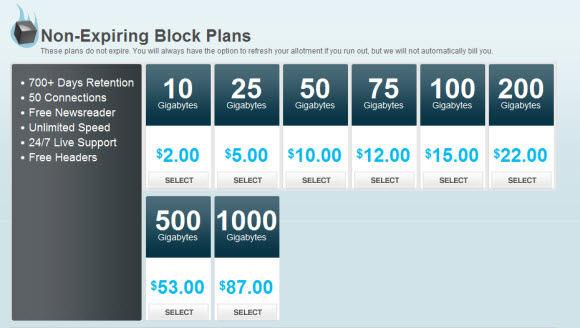
In May of this year NewsDemon discounted their block Usenet accounts by up to 60%.  Now they are adding a new feature – non-expiring Usenet blocks.  Where block plans previously expired after a year they will now last indefinitely.  Making the larger blocks – 500 GB to 1 TB an even better value since you don’t have to worry about the account expiring before you have a chance to download the full amount.

All non-expiring block plans come with 700+ days of binary retention, 50 connections, a free registered copy of News Rover newsreader, unlimited speed downloads, free headers and 24/7 technical support.  Read our NewsDemon review to learn more about their new block plans and unlimited Usenet offerings.

Binreader Usenet Client for Windows, Mac, Linux

We recently had the opportunity to test a new NZB downloader.  The Binreader Usenet client is currently in beta.  The new reader is free and available for Windows, Mac and Linux with an Android version coming soon.  The beta is currently available to download at http://www.binreader.com/

We took particular interest in the portable version of Binreader.  It is a Windows download that requires no installation.  Simply load the files on thumbdrive and run it from anywhere, very cool!  In addition the Binreader NZB client is available for Windows, Mac OS X (requires mplayer for streaming downloads), and Ubuntu / Kubuntu / Debian Linux versions.  With an Android newsreader in the works.

Their are a few key features that help Binreader stand out.  First in the simplicity of using the client.  We’ll demonstrate in a moment but it is the easiest newsreader we’ve used in quite a while.  It has one simple purpose.  Download and stream NZB files.  A function it performs very well.

Binreader includes some premium newsreader features.  Especially considering it is free.  First the client let’s you stream content while downloading.  It also extracts RAR files and does PAR repair automatically.  Even better it will pause the PAR files and only download them if necessary.  Now let’s take a look at the reader.

The first step is to download Binreader.  In our case we chose the Windows portable version and loaded it on thumbdrive.  No install, just pure Usenet goodness.

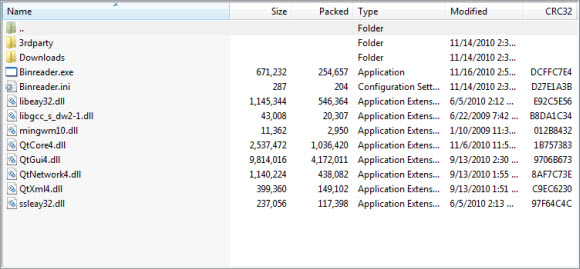
Next we copied the files to portable media and ran the Binreader executable to launch the client.  No installation required.


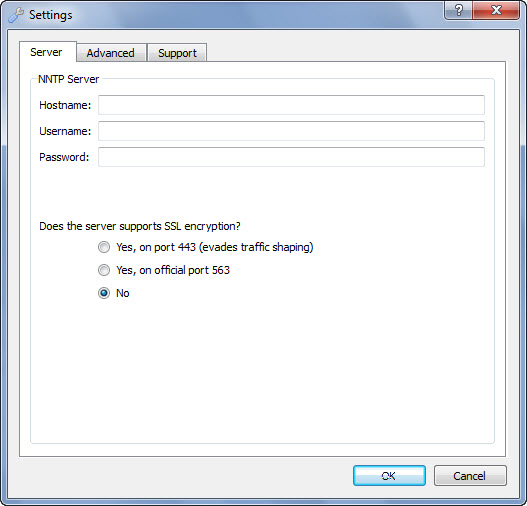
Before downloading the first time you will want to set the news server and account information for connecting to your Usenet provider.  Click the “Settings” button up top to get started.

Here you can set your news server, account and SSL settings.  We quickly entered our news server along with username and password.  Then came down and chose to run SSL via port 443.  Next you will want to click on the “Advanced” tab.

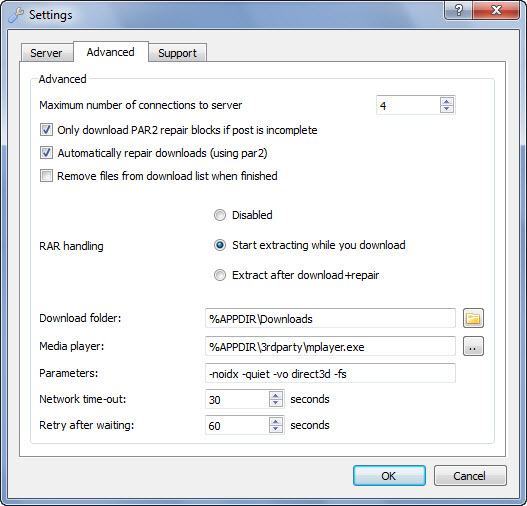
The first setting you will want to review is the maximum number of connections.  Binreader defaults to 4 but you can set it up to 50.  Tip: only use the minimum number of connections necessary to achieve your desired speed.  Any more wastes resources.  The next setting is great “Only download PAR2 repair blocks if post is incomplete“.  It is checked by default and will save you from downloading PAR files unless necessary.  The second option “Automatically repair downloads (using PAR2)” is equally important.  Let Binreader do the work for you.  While the third option isn’t checked by default the client will remove the files from the download list when finished if you like.  If not they are easy to clean up.

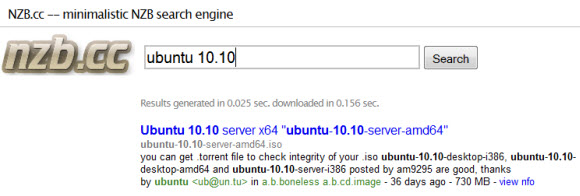
We left the RAR handling set to the default “Start extracting while you download”.  The download folder is important.  Especially if you decide to run Binreader off a thumbdrive like we did.  By default content is held in a downloads folder under the Binreader app folder.  This is easy to change.  For those using the reader in a normal setting the default is convenient.  We did not modify any of the other settings.  Now it was time to test some newsgroup downloads.  First we had to find a good NZB file for testing.  We headed over to NZB.cc to find a Ubuntu NZB.

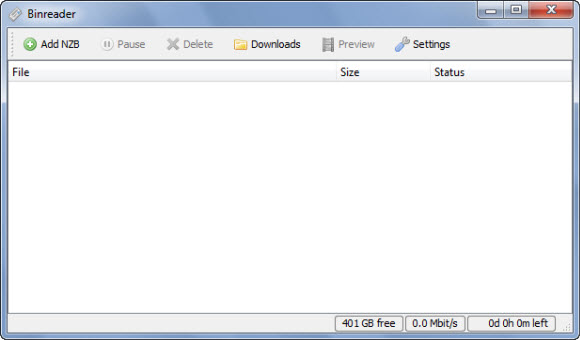
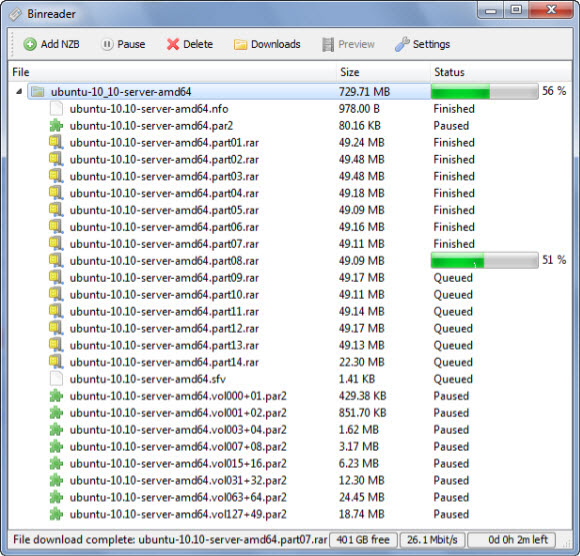
After finding a good Ubuntu NZB we downloaded the file and went back to Binreader.  Clicking “Add NZB” and selecting the NZB file will automatically queue and start the download as shown below.


As you can see in the image the download immediately started and the PAR2 files are paused.  They are only downloaded if necessary to repair the archive.  In our case Unbuntu downloaded and was automatically extracted without any need for repair.

After the download is completed you can simply click the “Downloads” button at the top of the Binreader interface and find your content.  One other note, when deleting downloads from within the Binreader interface it will ask whether you want to delete just the entry or the associated files.  Make sure to click “No” if you only want the entries deleted.  The message is clear but we wouldn’t want anyone accidentally deleting their downloaded content.

Well that wraps up our review or Binreader.  We enjoyed the Usenet client and look forward to using the portable version while on travel.  Definitely download a free copy of Binreader and enjoy!

Backdoor Access to Newzleech.com via Hidden URL

November 17th update:  Access to the site is completely down now.  No response via the home page or other URL’s.  It looks like Newzleech is gone for good.

Yesterday we discussed how the Newzleech.com site was down and gave readers some Newzleech alternatives.  A few minutes ago we got an anonymous tip that Newzleech is accessible again via a backdoor page.

We have no idea whether or not the hidden URL is intentional or simply left over from previous testing.  Either way if you would like to access Newzleech for now you can do so using this address:

http://www.newzleech.com/index2.php

Please take caution when accessing Newzleech via this link.  The search engine UI and results appear to be valid but you never know since we’re still not sure why the Newzleech home page reads – Newzleech is no more.

Newshosting Retention Update and Fall Usenet Special

Newshosting recently increased binary retention from 650 days up to 700 days and is offering a triple gig Fall Usenet special.  Enjoy a 30 GB free Newshosting trial.


The binary retention increase puts Newshosting at almost two years of retention.  Amazing considering where the industry was a couple years ago.  The increase to 700+ days of binary retention was immediate so all current and new subscribers can enjoy the update.

The Newshosting Fall Special includes triple the free trial gigs.  Combined with their current Usenet special you can enjoy unlimited Usenet access from $12.95 a month.  In addition to a 14 day, 30 GB free trial.

Read our Newshosting review or sign up for the new 30 GB free trial and enjoy!

Newzleech.com Down : Newzleech is No More

We had a surprise this morning.  One of those you wish you didn’t get.  Visiting Newzleech.com displayed a short message:

Newzleech is no more 🙁

Newzleech was a popular Usenet search engine with free access to over 600 days of binaries and a simply interface for finding and downloading NZB files.  While there are solid alternatives we will miss Newzleech and wish the site creators the best of luck in future endeavors.  We have no idea why the site shut down but it appears sudden as no one we talked to knew anything was coming.

For those who are looking for Newzleech alternatives you might consider these sites: Binsearch, NZB.cc, NGIndex, NZBsRus and NZBIndex.  For more options visit our Usenet search section and compare NZB sites.