Archives for September 2010

Merlins-Portal.net Relaunched : Welcome Back Merlin

After months of the site being down and Merlins farewell letter we were very surprised to see Merlins Portal live again.  No better way to start the Fall than to welcome back Merlin.  The newly designed merlins-portal.net launched earlier this week.


No doubt it will take some time for Merlin’s to rebuild the NZB library.  With a community in the thousands including old and new members within the first few days the site should come back quickly.

Here is the message from Merlin regarding the sites return:

Welcome back to Merlins Portal

Welcome to the old but new merlins portal, due to so much demand and arm twisting I have rebuilt the site from scratch.
If your an old member come on in and join and catch up with old friends.

Merlins Portal is the same as always, NO information restricted, NO money required to use the site. FREE is FREE in our book.
New look same ethos, same principles & morals.
In the few days we have re opened we have took in 1000’s of new/old members & 1000’s of NZB files as we rebuild or NZB library.
Good reputation is why we succeeded before and why we will again and why 1000’s use us then and now.
Hopefully see you on the other side and not just as a guest

New and old members always welcome. You will have to re register.

To learn more and join the Merlins community visit http://www.merlins-portal.net.

FastUsenet.org Launch and Free Apple iPad Giveaway

FastUsenet.org launched a new Usenet service yesterday.  To celebrate they are offering 50% discounts on all accounts.  The plans range from 6 GB a month to unlimited access.  All of which include iPhone and web newsreaders.


The FastUsenet service appears comparable to other leading newsgroup vendors.  We haven’t had a chance to test the service.  They offer a demo of the iPhone and web readers online.  While FastUsenet is not offering a free trial you could sign up for the 6 GB account ($3.95) to get a feel for the service.

Along with the 50% discount and iPad / web newsreaders, FastUsenet is giving away an Apple iPad 16GB WiFi edition.  Sign up for service between now and March 1st, 2011 to be automatically entered to win.

Read our FastUsenet review to learn more about the service or sign up for your chance to win the iPad.

Ngroups.net Octoberfest 2010 – $9.99 Unlimited Eco

Octoberfest is back.  Once again Ngroups.net is running an Octoberfest special.  This time around the offer consists of unlimited Usenet access with SSL and 20 connections for $9.99 a month as long as you keep the account.


The only difference between the Unlimited Eco account and Ngroups $19.99 Unlimited Extra is the number of connections – 20 versus 50.  I think you’ll find that 20 connections are plenty.

Specifics of the Octoberfest special:
– Unlimited Usenet access for $9.99 a month
– 650+ days of binary retention
– 3+ years of text retention
– Access to US and European newsgroup servers
– 20 concurrent connections
– 256-bit SSL encryption
– 24x7x365 support
– PayPal, Moneybookers, Liberty Reserve

Read our Ngroups review to learn more about the service or sign up for the Octoberfest offer and enjoy.

First Look : New Easynews Web-Based Usenet Browser

Easynews is developing a new web interface for their popular web-based Usenet service. Not to be confused.  This is not just a minor revision or tweak to the current browser.  The new webreader is geared toward those new to Usenet.  Along with newsgroup veterans who would prefer an easy to navigate, streamlined, in-browser Usenet experience.  While the current Easynews interface works fine, the new UI promises to integrate popular features with ease of use and a number of new enhancements.

The Easynews team has kept very busy over the last year.  Starting with major investments in infrastructure.  Followed by the release of Easyboost web accelerator.  Then came a 50% increase in retention boosting NNTP binary retention to over 600 days.  Earlier this year Easynews added free unlimited NNTP access to the Big Gig plan and made it a $9.98 add-on for other accounts.

Today though we want to give you a first look at the new webreader interface.  The in-browser UI provides a number of advantages over the current browser.  Not the least of which is easy navigation and improved usability.  Here are some of the early screenshots from the Easynews team.  Stay tuned for more details as the new web interface nears the beta testing stage.

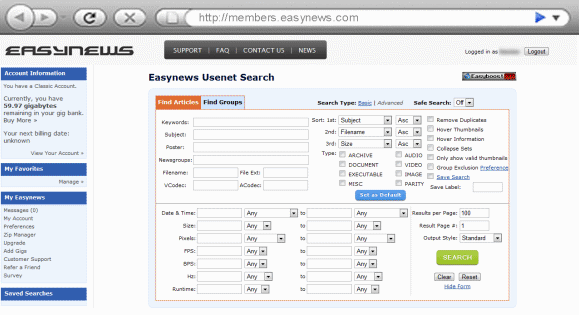
Let’s start with the new Easynews advanced search feature:

As you can see the advanced search is packed with options.  Search for Usenet posts by keyword, subject, poster, newsgroup, filename, extension, audio or video codec.  Narrow your search by content type including archive, document, executable, audio, video, image or parity file.  We also like the option to remove duplicates and collapse file sets.  You can add a date range, file size, pixels, FPS, BPS, Hz or runtime to your search criteria.  With a final option to save your search configuration.  For those less adventurous there is always the basic search option.
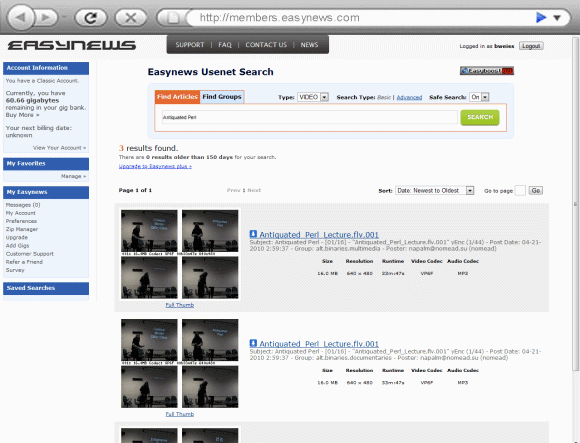
Now let’s take a look at the new Easynews video search results:


Check out the thumbnails!  How much time could you save by not downloading poor quality videos.  Now you can take a sneak peak before you queue them. Along with the small images there is a link to a full set of thumbnails.  More on that in a second.

The detailed information to the right of the images will provide you with the name of the file, date and time of the post along with the newsgroup and poster.  Just below you can quickly read the file size, resolution and runtime.  Along with the video and audio codec.  No more guessing or relying on NFO files.  Easynews does the work for you.

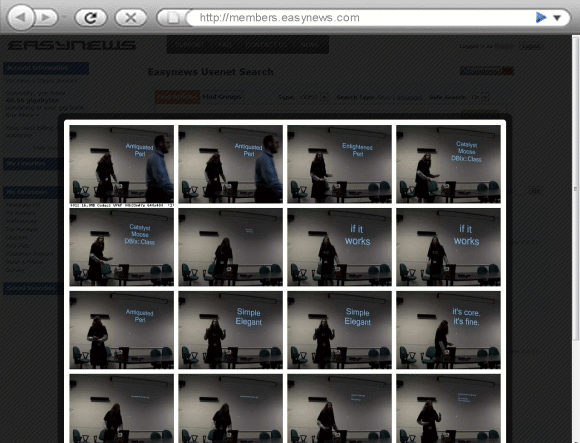
How about the new Easynews full video thumbnail view:


You’ll notice that the full thumbnail view displays several frames from throughout the video.  Very cool feature!

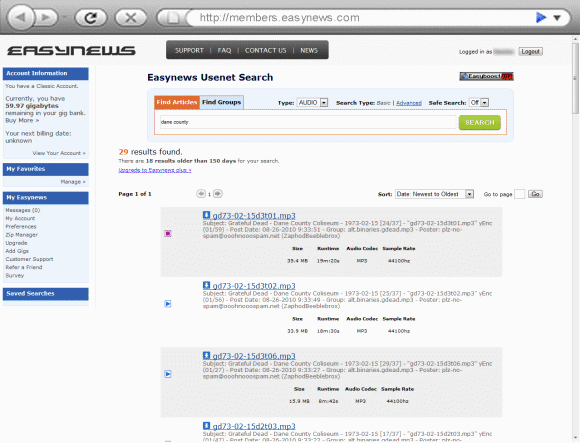
Now on to the new Easynews audio search results:


The audio search results are similar to the video search above.  Starting with the post name, date and time, newsgroup and poster.  Along with relevant file information including size, runtime, audio codec and sample rate.

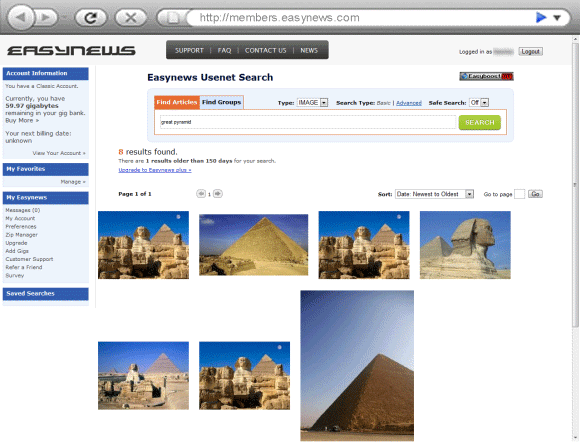
Last but not least – the new Easynews image search results:


While we prefer the swimsuit model images from the Easynews homepage the Great Pyramid will have to do for now.  We’ll bring you some swimsuit shots during the upcoming beta test phase.

The results are very similar to the style used by Google Images.  This particular example shows two rows of images.  While there are only 7 results for this search criteria we’ll get more in our swimsuit search.  All for a good cause.  To test the sort feature, lol.

I hope you’ve enjoyed our first look at the upcoming Easynews web interface.  Expect lots more coverage to come as the new web-based browser moves to beta testing in the weeks ahead.  In the meantime if you would like to learn more about the Usenet service read our Easynews review or sign up for a two week free trial.

News Rover Usenet Newsreader Version 16 Released

News Rover released Version 16 of their popular Usenet newsreader yesterday. Noting performance as the focus for the update.  According to release notes the new version eliminates the need for temp files while downloading which helps to reduce total disk I/O by 75%.  Thus improving download performance and reducing the resources used by the Usenet client.

Customers who paid for a subscription within the last year can download the new version free.  Otherwise the price is $24.95 for previous customers or $29.95 for those new to News Rover.  The subscription fee also covers a year of Usenet search.

Read our News Rover review or visit their Newsrover.com to learn more.

—————

Here is a list of enhancements from the version 16 release notes:

======== Version 16.0, Rev. 0: 7 Sep 2010 ========

  • The focus of improvements in version 16 is for performance — especially when downloading large files through broadband connections. We have done extensive testing and benchmarking using a 50 MB/sec DOCSIS 3.0 cable modem, and the results of the improvement are dramatic.We have added a sophisticated, multi-threading caching system that eliminates the need for temp files when downloading and decoding messages. This reduces the total disk I/O by 75% (not counting RAR decompression). This reduction in disk I/O increases the download speed and reduces the impact of News Rover on your system.In addition to the caching system, we added a final output stage that can buffer up to 32MB of data and write the blocks to the disk asynchronously. So if the disk is busy, News Rover can continue to download and decode and then burst the data out when the disk can accept it.
  • We have added a pop-up image preview screen to display thumbnail pictures of JPG images as they are downloaded. To open the screen, click the icon near the middle of the toolbar that looks like a screen with a small window in it. You can move and resize the display window. Whenever a JPG image is downloaded it will be displayed in the preview window. The preview window works with any method of downloading images — subscribed newsgroups, Autoscan, or Usenet search, but it is particularly useful when you are using an Autoscan group to scan and download pictures from an image newsgroup.There are two options on the Configure/General page related to the preview screen: (1) you can specify the minimum amount of time that an image will be displayed before it is replaced by the next one, and (2) you can detach the preview window from News Rover. If you detach the preview window, then it can be displayed while News Rover is minimized.
  • The output of RAR and NZB files are now put in private subfolders to avoid file name conflicts.
  • We have added a field to the main-screen status bar to display the current download speed. This allows you to easily monitor the network speed without having to open any other windows.
  • Options have been added to the newsgroup subscription screen to sort the list of newsgroups either by name or by number of messages in the groups.
  • Options have been added to the global Usenet search screen to sort the search hits by date, subject, or size.
  • When a sender is blocked by right clicking and selecting “Sender…/Block messages from sender”, all messages posted by the sender in the current group are deleted, and a background task is started that deletes all messages posted by the sender in other groups.
  • A new right-click option has been added to the message list. You can right click on a message entry and select “Sender…/Delete current messages from sender” to delete all messages posted by the sender in the current newsgroup without blocking the sender.
  • Improved the way unique file names are created by appending “-nn” in the case where file names have more than one period.
  • Fixed a bug involving the NEAR and BEFORE operators in search filters.
  • UseNetServer Increases Binary Retention to 650 Days

    Earlier today UseNetServer updated their homepage with an additional 50 days of binary retention.  Increasing from 600 days up to 650 days.  The retention update is immediate so all current and new customers can take advantage of the extra two months of retention.


    UseNetServer offers NGR customers a great value.  You’ll notice the image above shows the price of their High-Speed Plus plan as low as $15.98.  For our visitors they offer the same High-Speed Plus plan (unlimited Usenet plus UNS Global Search) for $10 a month.   Visit our UseNetServer special offer page for more details.

    Let’s take a look at some of UseNetServer’s features:
    $10/mo. unlimited Usenet for life!
    $95/yr. unlimited Usenet for life!
    – 650 days of binary retention
    – 730 days of text retention
    – 99%+ completion rate
    – 85,000+ newsgroups
    – 20 concurrent connections
    – Free SSL encryption
    – News servers in the US and Europe
    – 24/7 tech support

    Read our UseNetServer review to learn more or sign up for $10 unlimited Usenet and enjoy!

    —————

    Here is the official press release:

    UsenetServer Upgrades to 650 Days Retention

    ASHBURN, VA, September 7 – USENETSERVER.COM, the industry-leader in low cost Usenet service reliability, speed and article retention, today announced that it has upgraded binary retention across all newsgroups to 650 days. In addition to 650 days of binary retention, UsenetServer’s text group retention currently surpasses two years.  This service enhancement comes at no additional cost to UsenetServer subscribers.

    UsenetServer’s new binary retention level is made possible by the addition of many new racks of storage and upgrades to the UNS server farms in both the United States and Europe.

    With this world class retention level, super-fast connections, 256-bit SSL access, unlimited download packages and 99+% completion rate, UsenetServer continues to offer the fastest, most secure Usenet access in the industry for the lowest prices available anywhere.  UsenetServer welcomes all users worldwide to explore any of its unlimited access accounts with a 14 day/10 GB free trial.

    UsenetServer’s latest retention upgrade is preceded by a freshly redesigned and internationalized website that hosts content in 10 different languages.  UsenetServers’s new website also supports PayPal as well as provides streamlined content and Usenet tools such as Newsgroup Search, Traceroute and Global search to provide UNS users with the ultimate Usenet experience.

    Stay tuned for more exciting service enhancements from UsenetServer.

    Newsgroups.com Offering $10.95 Unlimited Usenet

    After hosting Usenet related information for the last year a new service has launched at newsgroups.com.  The features are similar to many top providers.  Offering high retention, completion and connections at a value.  We haven’t had a chance to test the newsgroups.com service yet but notice they offer a 7 day, 3 gig free trial.


    Newsgroups.com Usenet features:
    – $10.95/mo. unlimited access
    – Free 7 day, 3 GB trial
    – Free SSL encryption
    – 600 days of binary retention
    – 730 days of text retention
    – 99%+ completion rate
    – 50 concurrent connections
    – News servers in the US and Europe
    – 24/7 tech support

    Read our Newsgroups.com review to learn more or sign up for a free trial.

    Beginner’s Guide to Free Usenet Newsgroup Trials

    Are you new to Usenet and confused by all the choices out there?  Perhaps a friend has recommended a Usenet provider or you’ve read about services on Newsgroup Reviews but haven’t quite decided yet.

    Free Usenet trials are a great way to test newsgroup services and help make a buying decision.  Most top providers offer free Usenet access for new customers.  As with any free trial you’ll want to understand the terms prior to signing up.  That’s where this guide comes in.  Below we will list the top newsgroup trials from NGR along with details for each trial.  First though we want to cover some general Q & A.

    Why do Usenet provider’s require so much information for a free trial?  Why not just ask for my email address?

    Fraud prevention.  A trial based simply on email address would be abused.

    Alright they need some personal information but why collect billing information for a free trial?

    Free Usenet trials are similar to Netflix, Blockbuster, Rhapsody and other brand name subscription services.  While signing up for a free trial you will choose a plan and enter billing information.  Some will even preauthorize charges prior to activating the trial.

    Why would I choose a paid account type for a “free” trial?

    The “paid” subscription applies if you exceed the trial terms (either in days or usage) before canceling service.  In other words if you exceed the trial terms they assume you want to keep the service and bill accordingly based on the plan chosen during sign up.

    That one really seems to catch some people.  They sign up for a free trial and forget to cancel or exceed the download limit by accident.  Then are confused when the provider bills them.  Please be clear that it is your responsibility to cancel during the trial period to avoid charges.  That means if the trial is 14 days and up to 10 gigs you shouldn’t exceed either one.  There isn’t typically a warning sent when you get close to the download or time limit.  Exceeding either one will transition the free trial into a paid account.

    More general tips on how free Usenet trials work:

    Most Usenet veterans seem comfortable with the way trials work.  Probably because they’ve tried a few through the years.  New users sometimes get frustrated.  Thinking the free trial will expire without any action on their part.  That isn’t the case.  You have to cancel the account during the trial period to avoid being charged.  Before exceeding the time or download limit.

    The cancellation process varies between services but you normally visit the website, log in to your account and cancel service.  Each provider should have clear instructions on the site.  If you are considering a service that doesn’t make it clear you might want to avoid them.

    Also pay attention to the account choices during sign up.  Some provider’s will offer discounted annual plans.  Most include one time billing.  Meaning if you exceed the free trial terms without canceling the company will automatically bill for a year of service.  Normally at a considerable discount which is nice if you want the service but not so good if you just forget to cancel.

    Free Usenet Trial Details:

    Now that we’ve covered the basics let’s take a close look at some of the top Usenet provider’s free trial offerings.

    1.  NewsDemon

    Trial details:  NewsDemon offers our visitors a special free trial.  They call it the “NGR Demon Trial“.  It consists of 7 days of free Usenet and up to 15 gigs of usage.  What makes the trial so special is that it combines with their “Demon Deal” which includes over 50% off unlimited Usenet access.  Meaning if you stay beyond the trial the cost is $10.95 a month versus the normal $22.99.

    Pros: Trial + discount, free newsreader and free online storage.

    Cons: None

    2.  Newshosting

    Trial details:  Newshosting also offers NGR visitors a free trial combined with discount pricing.  The trial term is 14 days with up to 10 gigs of downloads.  Followed by a discounted price of $12.95 for Unlimited or $15.95 for XL Powerpack account.  The differnce being number of connections.  Tip: go with the Unlimited account as 30 connections is plenty.

    Pros: Trial + discount

    Cons: None

    3.  Giganews

    Trial details:  Giganews offers a 14 day free Usenet trial with up to 10 GB of usage.  They also combine it with a special offer of 50% off the first month for Diamond sign ups.

    Pros: Trial + discount for Diamond account

    Cons: Diamond accounts do not include VyprVPN access during the trial period.

    4. UseNetServer

    Trial details:  UseNetServer offers a 14 day, 10 GB free Usenet trial.  We like the service a lot but what makes it a great value is the UNS special offers which include unlimited access for $10 a month or $95.40 a year.  Unfortunately if you take advantage of their free trial retail pricing applies.  In this case we suggest forgoing the trial for the lifetime discount.

    Pros: Standard trial terms.

    Cons: The trial ends in retail pricing.

    5. Power Usenet

    Trial details:  Power Usenet offers a 5 days, 10 GB free newsgroup trial.  They also combine it with a special offer that includes 50% off your first month of unlimited access.

    Pros: Trial + discount.

    Cons: The trial term (5 days) is a bit shorter than most.  Still plenty of time though.

    6. Easynews

    Trial details:  Easynews offers a 14 day free Usenet trial with up to 10 GB of downloads.  The trial only applies to Classic accounts.

    Pros: Standard trial terms.

    Cons: The trial only applies to Classic accounts.

    I hope this guide has helped you better understand how free Usenet trials work.  We will keep a running list of the best free newsgroup trials on NGR along with the details of each trial.  Leaving you with the final advice of always reading and understanding the full terms of a Usenet trial or any other offer before signing up.

    NewsDemon Announces 650 Days of Binary Retention

    On September 1st NewsDemon announced they are offering 650 days of binary retention.  Regardless of plan type subscribers now receive 50 days of extra retention.

    NewsDemon offers a number of extra features and special offers for NGR visitors.  We have written about each at length in previous posts. Here is a list of what you can expect from NewsDemon along with links to more details.

    NewsDemon Usenet features:
    – $10.95/mo. unlimited for life! (Demon Deal)
    – Bonus of 14 free days your first month (Details)
    – Free 7 day, 15 GB trial + Demon deal (Details)
    – Free 30 GB of online storage via StorageNinja (Details)
    – Free licensed newsreader (News Rover)
    – Free SSL encryption
    – 650 days of binary retention
    – 1,400 days of text retention
    – 99%+ completion rate
    – 100,000+ newsgroups
    – 50 concurrent connections
    – News servers in the US and Europe
    – 24/7 tech support

    Read our NewsDemon review to learn more about the service or sign up for the Demon Deal ($10.95 unlimited Usenet) and enjoy!

    —————

    Here is the official announcement from the NewsDemon Blog:

    NewsDemon.com Newsgroups has completed another milestone now offering 650 days of binary retention for all members.

    All monthly and block account subscribers of NewsDemon.com Newsgroups automatically have access to the complete 650 days of binary retention.

    The new increase in binary retention is relative to how long a binary or text file is available on newsgroups. Now, 650 days of history on newsgroups can now be accessed by all NewsDemon.com Newsgroup members. Additionally, over 1400 days of text retention is also available. These new features are free of charge and part of any of the NewsDemon.com Newsgroup plans.

    NewsDemon.com Newsgroups continues to extend forward on providing extended features for all its members. Committed to providing superior service and exceptional support to the Usenet community and its members, NewsDemon.com Newsgroups is proud to offer affordable premium access to over 107,000 newsgroups at blazing speeds.

    VyprVPN for iPhone – Protection On the Go

    We’ve been using VyprVPN for awhile since it comes free with the Giganews Diamond account.  Lately the iPhone VPN client has come in quite handy.  For long distance travel, around town and even at home using wireless network.

    VyprVPN for iPhone is easy to set up and will work over wireless or AT&T’s 3G network.  Those new to personal VPN’s will find the configuration to be quite simple.  In fact the Golden Frog site includes this message:

    Within a few seconds you will have a VyprVPN connection up and running on the iPhone.  Then with a couple taps you can connect or disconnect from the VPN service anytime you want.  VyprVPN offers servers in Los angeles, Washington, D. C., Europe and Asia and allows you to switch between them at will.

    If you wonder “What is VPN?” or “Why would I use a personal VPN?” then visit the Golden Frog. We have a complete set of VyprVPN configuration guides on NGR covering PPTP VPN setup on Windows 7, Mac OS X, iPhone 4 and iPad.